Showing posts with label seo. Show all posts

Thursday, December 22, 2016

Proven Tips to Choose The Best Domain Name For Your Blog

So here you are with the thought to start a new blog. How are you going to do it? Do you have any plan?

Well, the first step is to search for the name of your blog what we call a domain name. Do you know how to choose the best domain name?

Nothing to worry about. I am here to let you know about the simple things which can be helpful in finding the perfect domain name of your new blog.

What Are The Things To Consider To Choose The Best Domain Name?
Before you jump in this blogosphere, you must learn a few things so that your first step is perfect.

Have the basic knowledge of SEO, keywords, niche etc. It�s because you will get your domain name according to these factors.

Let me show you the list.

#1. Add A keyword of your Niche.

The domain name of your blog should have the keyword of the niche you are going to write about. Suppose, you want to write about blogging then include it in the domain name.

If you�re a tech enthusiast then embed something related to technology.

The thing is that it will improve the SEO of your blog. It would be helpful for your future goals.

#2. Never Complicate it.

Keep the name simple as possible.

Don�t try to show your creativity with this one name. Do you remember coffee?

Well, it�s the most common thing you see or drink every day. Maybe you�re an addict. It�s because of its simplicity and the daily use.

You should bring a simple name which is easy to remember and people can type it within a few seconds.

#3. Use The Common Extension.

how to choose the best domain name

Though people are spreading the domain name extensions but for the start, you should choose the .com, .org or maybe .net.

Let us play a game. You have to guess a domain name. What would be the first extension you add?

Won�t that �.com�?

That�s what I am talking about.

#4. Check the Meaning of The Name.

Sometimes, people just select an unusual name without even knowing its meaning.

Always check the meaning of the words you are embedding in the domain name. It can be turn out to be something funny which you never wanted.

To choose the best domain name, vocabulary can be something you need.

#5. Don�t Add Numbers.

If you�re thinking about adding any number or any other symbol then drop the idea.

The domain name like www.you4me.com is only good to read. But from a professional level, it�s useless.

Have you seen any professional website consisting any symbols like @,#,$,% ? Well, the answer would be no. Your readers can�t remember it.

#6. Do Some Research.

select the best domain name

You should search if the domain name you�re going to choose is trademarked.

If you choose the similar name to any famous company then it won�t be good. You should select something unique. Don�t be a copycat.

You may have seen the domain names like www.seotojournal.com which is related to the www.seojournal.com.

You can�t be like that.

#7. You Can Build Your Own Brand.

People have the urge to spread their names around the world. It can be done by choosing a domain name of your name.

You can start your own blog and make money with the domain name like www.johnsmith.com. It can be your name, your mother�s name or anything you want.

#8. Don�t Do Spelling Mistakes.

A great idea can be proved as the worst one if you unintentionally do the spelling mistakes.

A few days ago, when I was trying to set up the Facebook Page of my blog, I did a mistake in the name. BloggingLove was written as BlggingLove.

And you know what, no one even noticed it for many days.

That�s funny. And finally, I corrected it. This is one of the most important things to choose the best domain name.

#9. Never Limit To Your Area.

Unless and until you are starting a local business, you should never put the name of your country or state.

You never know your future. Maybe you would be the famous person all over the world. It won�t be favorable if you include something which is limited to your area.

Spread it and choose a name which can be known by everyone.

A few people add the words of their languages which can�t be understood by others. Like HINDI can�t be understood by everyone outside INDIA.

#10. Don�t Confuse With The Words.

choose the best domain name

Let me give you an example.

www.yourworld.com and www.urworld.com
Which one is easy to read and remember? Don�t you think the second one is confusing? You shouldn�t do that.

Don�t confuse your readers.

Nowadays, people bring their chatting experience in such things. You should learn the possible ways to keep it away from your professional work and choose the best domain name.

#11. Short Is Better.

Are you thinking about something like www.youaredreamgirl.com ?

If you�re then you should check it again. You�re not here to celebrate your love anniversary or something.

Come on, be professional and bring something which is short and professional.

How about www.techgeek.com ? Isn�t that short and easy to find? What about blogginglove, bloggingpage, bloggingtips ?

The choice is yours.

Can you Now Choose the Best Domain Name For Your Blog?
The name of your blog shows what you have in your mind. Whether you start a blog for any professional niche or just for fun, you should choose the best domain name.

From all those points mentioned above. Can you now choose the domain name which is short, simple, easy and effective?

If you still have any doubt then take some advice from your friends and decide carefully.

Thursday, April 28, 2016

Cara Agar Artikel Blog Cepat Terindex Google - Yahoo - Bing

Cara Agar Artikel/Postingan Cepat Terindex Google, Yahoo dan Bing, banyak pertanyaan dari pengunjung tentang bagaimana cara agar artikel atau postingan di blog cepat terindex Google atau di indeks oleh mesin pencari (search engine) yang lainnya pada blog/website, sebenarnya tips SEO agar postingan/artikel blog cepat muncul di Google index ini sudah banyak diulas oleh para Blogger maupun pakar SEO, tapi disini saya akan mengulas kembali dengan pengalaman yang saya ketahui.

Cara Cepat Terindex Search Engine Google

Terindeks oleh search engine adalah hal yang sangat penting bagi kemajuan dan perkembangan blog/website anda, tanpa di indeks blog anda akan kesepian pengunjung dan terlihat mati meskipun anda menulis konten yang fresh dan berkualitas tapi tetap konten anda akan seperti terkubur, nah disinilah pengetahuan SEO itu berfungsi agar konten pada blog anda dikenali dan terindex oleh mesin pencari seperti Google, Yahoo, Bing maupun search engine lainnya karena hampir 60% pengunjung akan datang dari mesin pencari, Ada beberapa teknik atau strategi yang harus anda terapkan agar cepat terindex.

Konten
Submit Sitemap ke Search Engine Google/Bing
Link Building Agar Postingan Cepat Terindex Mesin Pencari
Cara Cepat Terdeteksi Google Dengan Social Bookmarking/Social Media
Internal Linking Dalam Halaman Blog/Website
Ping website/blog untuk memanggil Google/Bing spider
Komentar Pada Blog Agar Cepat Terindex Search Engine
Update Konten Artikel Blog/Website Secara Teratur
Mobile Friendly dan Responsive Design

Submit Sitemap ke Search Engine Google/Bing

Sitemap adalah sebuah daftar isi yang menerangkan tentang apa yang ada pada blog/website anda, sitemap disini bukan daftar isi yang seperti ada pada halaman melainkan sitemap yang berupa XML, XML adalah sebuah bahasa yang hanya dimengerti oleh search engine. Untuk pengguna Wordpress bisa membuat sitemap dengan plugin, dan untuk pengguna Blogspot biasanya sudah terintegrasi, seperti pada contoh dibawah.


  • http://bloggerpeer.blogspot.com/sitemap.xml
  • http://bloggerpeer.blogspot.com/atom.xml?redirect=false&start-index=1&max-results=500
  • http://bloggerpeer.blogspot.com/feeds/posts/default?orderby=updated

Silahkan submit sitemap anda pada Google Webmaster Tools, untuk Bing/Yahoo silahkan submit ke Bing Webmaster Tools

Link Building Agar Postingan Cepat Terindex Mesin Pencari

Untuk cepat terindex anda harus membangun link ke halaman post anda, jangan hanya mencari link mengarah ke homepage saja, carilah link dofollow yang mengarah ke konten anda. Hal ini juga akan membuat blog anda menjadi populer dan terpercaya di mata search engine, mesin pencari seperti Google sangat senang dengan blog/web yang mempunyai link dofollow yang relevan yang mengarah ke halaman blog anda dan Google Pagerank pun bisa anda dapatkan.

Cara Cepat Terdeteksi Google Dengan Social Bookmarking/Social Media

Salah satu cara yang sangat cepat agar blog anda terindex mesin pencari adalah dengan membagikan (share) konten anda pada situs social media atau social bookmark yang banyak di jumpai sekarang ini seperti Google+, Twitter, Facebook, Linkedin, Pinterest, dll. Selain itu blog anda juga akan mendapatkan traffic dari situs social media tersebut.

Internal Linking Dalam Halaman Blog/Website

Jika anda ingin halaman baru pada situs anda diindeks cepat maka internal linking akan menjadi sangat berguna. Sebutkan halaman baru anda dengan anchor text link, dan perbarui (update) halaman yang sudah terindeks sebelumnya dengan menyertakan link ke halaman baru anda (pastikan pembahasan pada konten anda sebelumnya cocok dengan konten anda yang baru).

Linking halaman situs anda bukan hanya tentang membangun external backlink. Hal yang sangat penting juga adalah membangun link dalam website anda (internal linking) yang akan mengingatkan mesin pencari tentang kehadiran konten baru pada situs anda.

Ping website/blog untuk memanggil Google/Bing spider

Ping pada mulanya merupakan metode untuk blogger untuk memperingatkan mesin pencari pada konten baru di blog mereka. Namun, telah berkembang di mana setiap orang dapat menggunakannya untuk memperbarui (update) bukan hanya blog tapi juga website tradisional

Ping adalah sarana yang sangat berguna memperingatkan mesin pencari dan direktori untuk pembaruan dalam konten anda.
Ada banyak situs layanan ping online yang tersedia. Beberapa yang terbaik yang saya ketahui adalah:

pingoat.com

pingler.com

pingomatic.com

Komentar Pada Blog Agar Cepat Terindex Search Engine

Blog dengan pembaca yang aktif dan banyak konten baru akan di crawled secara teratur oleh search engine, dengan berkomentar pada blog seperti itu maka anda akan mendapatkan imbas dari popularitasnya dan akan mendapatkan halaman sendiri diindeks dengan cepat. Cobalah mengomentari posting terakhir pada blog-blog yang sudah terkenal dan mempunyai ranking tinggi, ini adalah cara yang sangat efektif untuk mendapatkan halaman baru diindeks cepat dan pastikan bahwa anda menggunakan halaman yang ingin diindeks sebagai URL website anda ketika berkomentar tidak hanya halaman muka (homepage) saja.

Update Konten Artikel Blog/Website Secara Teratur

Pastikan anda memperbarui situs anda secara teratur, konten atau artikel yang fresh adalah penting untuk mendapatkan halaman baru diindeks. Jika konten/postingan yang ada pada blog anda sudah basi maka search engine tidak akan menjelajahi (crawl) blog anda secara teratur, Di sisi lain, jika anda menjaga blog anda segar dan diperbarui (meskipun memperbarui halaman indeks) maka spider mesin pencari akan terus datang kembali. Sebagai alasan kenapa banyak blog mempunyai peringkat baik dan artikel nya terindeks cepat tidak lain adalah karena si pemilik blog sering memperbarui situs mereka dengan konten atau postingan baru yang segar.

Mobile Friendly dan Responsive Design

Tidak bisa dipungkiri lagi, pengguna gadget smartphone dan tablet sekarang sudah melebihi dari pengguna komputer PC dan laptop, maka wajib bagi kita sekarang untuk mengubah template lama kita agar responsive dan mobile friendly agar visitor yang berkunjung ke situs/blog kita tidak kesusahan untuk membaca konten yang ada di blog kita, apalagi sekarang Google sudah menerapkan algoritma MOBILEGEDDON yang meharuskan kita untuk membuat website/blog yang mobile friendly dan tentu saja ini akan berpengaruh besar pada SEO Onpage dan ranking kita di Google search khususnya mobile search. Jadi buat anda yang masih menggunakan template lama silahkan di-upgrade agar bisa mobile friendly dan agar cepat terindeks Google, beberapa hari yang lalu saya pernah me-review premium responsive dan SEO friendly Blogger template yang saya pakai di blog saya ini, dan untuk tampilannya lumayan bagus dan elegan.

Itulah beberapa tips seo tentang cara agar blog terindex cepat oleh search engine/mesin pencari sesuai dengan pengalaman saya, kalau ada kekurangan dan saran lain bisa disampaikan melalui komentar

Happy Blogging..!

Sunday, April 10, 2016

Latest Custom Robots.txt file settings in Blogger for SEO

Custom Robots.txt for blogger
Today I will show you How to Enable Custom Robot.txt File in Blogger for better SEO and search engine results?

Blogger now lets you edit your blog's robots.txt file. What are Robots.txt files, robots files are plain text files which instruct the search engines what to not index. Robot.txt is a way to tell search engines whether they are allow to index a page in the search result or not. The bots are automatic, and before they could access your site, they check the Robot.txt file to make sure whether they are allowed to crawl this page or not.

How to Enable Custom Robots.txt in Blogger


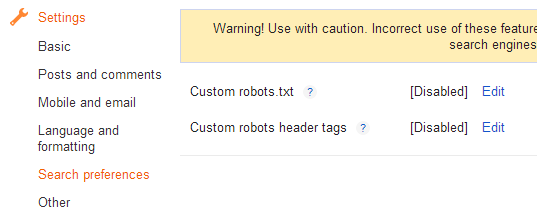
1. Blogger Dashboard >> Select Blog >> Select Settings tab >> Search Preferences

Robots.txt

2. Click on Edit in front of Custom robots.txt
3. Click on Yes and proceed to next step.
3. Next a box comes up and paste following given code.

User-agent: Mediapartners-Google
Disallow:

User-agent: *
Disallow: /search
Allow: /
Sitemap: http://YOURBLOGURL.blogspot.com/sitemap.xml
4. and finally click on Save Changes button to save code.

I hope this tip would help you. If you are having any issue regarding crawling then, feel free to leave your questions in the comments below and I would try to help you in solving them.

Friday, January 22, 2016

Best Tips For A New Business Website

Website Promote, Website Traffic, Business Website, Web Design, Promote Business, Promoote Website
Do you have a business website? Is your website winning you the benefits that you expected? If such questions coming on your way means you might need to contact a web design company to make a new business website design with some more workable features. Below listed are some tips for making a new business website design.

Balanced and Logical Content

Don't stuff too much information about your products or services on one web page, because the excess information might discourage your visitor to go ahead. Find out a Florida web design company having experienced professionals, that can arrange all your information properly on the website. Most important, is to be updated. Remove the information about your products or services you are no more offering.

Clearly visible contact details

Are you having contact details in your old website? If not, then this might the reason for the fall of your online business. Most visitors move away and visit other websites if they don't get the contact details, where they can make product or service related query. Do acknowledge contact details or contact form to allow the visitors to sort instant queries.

Option for live chat

Live chat option can attract more visitors, as they can get instant information and feedback from your business expert. Live chat can convert a visitor into a customer. Through live chat your expected buyers can sort their queries and also learn more about your offers. It can frame a rapport and activate the buying cycle.

Mobile Compatibility

Mobile phones are normally used nowadays to access the internet. People prefer online shopping on their smart phones to save their time. This is also a type of marketing, and it has highlighted the attention of many buyers. You should be sure that your new website is having mobile compatibility feature, that must not be confusing while going through the content catalogue.

Including the above mentioned features, your new website must also be SEO friendly, having additional features like Social Media Integration, Sitemap, Language Translator, Browser Compatibility and fast load times.

Your website is an investment, that plays an important role to promote your product or services. So search and contact the best website design company in USA and let the visitors look out your best services and products when they peep inside. Keep in mind, a good website design can support your business, on the other hand a not properly designed website can be a nightmare, disappointing your potential customers.

Author By Henry Brown

Best Digital Marketing Services via Rank You Up

SEO marketing, in Search, Website Traffic, Promote Business, Website Promote
Internet is the best stage to promote the dispatch of the new things. On the other hand, clients ought to direct their own particular exploration to choose the best Internet showcasing organization. A decent quality association will convey taking after SEO systems to upgrade the brand estimation of the customers. That is the errand it has close by and to see those outcomes work out, it strategizes, plans, executes, screens, adjusts and finishes off with the proper way of time.

Enhancement: Internet showcasing administration suppliers concentrate on offering quality substance to the groups of onlookers. No one in their right personality such as to peruse heaps of data on the page unless it is extremely intriguing.

Henceforth, you ought to keep the content material short and exact. Pictures talk louder than words and recordings are far superior.

It is an old saying yet very applicable in the period of computerized showcasing. For example, on the off chance that you are giving depiction of the item incorporate a picture or a video. It will go far in awing the mind of the general population.

Writes and articles: A rumored internet advertising organization has exhibit of experts who can compose snappy challenge about the property of the things.

They post articles and writes crosswise over various discussions on the Internet to upgrade the brand estimation of the organization.

In addition, they likewise collaborate with online clients to answer their inquiries about the results of the organization.

Because of industrious promoting exercises, the perceivability of the site will increment and it will improve the Internet activity.

Enhancing the heads and titles: The Internet crawler experts dispatch watchword research technique to discover the improved writings, which are utilized to hunt data identified with the things.

They plan the substance of the site focused on the watchword.

In addition, digital marketing specialists additionally deal with the format of the site to guarantee that client can look the data in a bother freeway.

Adjust the substance: The SEO group chipping away at the site ought to adjust its goal to upgrade the client experience.

Google calculations are changing each day, along these lines promoting specialists ought to adjust to the circumstance in a snappy and powerful way.

You ought to make versatile streamlined site since lion's share of individuals are utilizing advanced mobile phones to get to the Internetsite pages.

Ensure that site is not moderate or else the Google will minimize its rankings.

Off page procedures: A top notch SEO group will direct advertising on discussions that fit in with comparative corner of items.

Specialists add a connection to the site in the wake of composing the online journal to guarantee that the individual visits the site. Crawlers notice such connections and list them into the Internet index posting.

They will make your site conspicuous and build its positioning.

You can likewise submit connections to the unmistakable online registries situated over the Internet. Specialists ought to present the connections on pertinent classes with the goal that individuals could see the sites and visit them.

Submitted By william huges

Sunday, January 10, 2016

5 Ways You Can Increase Your Online Traffic

marketing, tips and tricks, website promote, SEO, Business Promotion
It's the end of the year and you're noticing your traffic becoming stale. Your New Year business goal is to increase online traffic by 12%, but you're only impressed by the results of some of your tactics, and you're not sure how relevant the rest are for today's web climate. While there are strategies that are essential to your web presence and some that are tailored to work for you, here are some growingly successful tactics and still relevant tips for seeing your traffic increase in 2016.

1. Use on-page SEO.
Making sure your page is search engine-friendly is still an important tactic in 2016. While Google may advise against link building, it still stands as one of the most important ranking elements this year. Create new content with external links, take a look at meta descriptions and brush up on keyword research. It's likely you'll see a gradual difference in your traffic and ranking on Google.

2. Use LinkedIn to post.
LinkedIn has paved the way for business networking, and it's where you'll see the most activity online for professionals on social media. Posting interesting and engaging content on LinkedIn could boost traffic to your site and increase your visibility within your industry. Make sure to add it to your social media strategy if you haven't already done so for the New Year.

3. Write a guest blog.
Guest blogging serves a similar purpose as posting on LinkedIn in terms of visibility. Despite what you may have heard, blogging is still relevant this year in terms of SEO as it keeps fresh content on your page (which is an important component for your ranking), but guest blogging is a great way to get some cross promotion. Make sure to stick with reputable sites and avoid anything spammy if you don't want a big penalty.

4. Interview interesting people.
Interviews with thought-leaders are a wave of thought provoking content that does very well on social media and on-site. Reach out to your industry leaders and people you admire for an interview, and keep it simple. Cross promotion is your best friend, as chances are they'll promote the interview to their massive tribe as well (or politely ask them to!).

5. Use Instagram for Freebies.
Adding a good sweepstakes or promotion across your social media channels is known to be tried and true for those who do it well, but ecommerce merchants are starting to find Instagram to be the forerunner in effective marketing channels. Giveaways are a fun way to increase your followers, but try adding a call to action to your site or to invite a friend to your channel in order for your followers to win.

Another rapidly growing tactic on Instagram is to send free samples to personalities and influencers with a huge follower base already. Do some research and find the Instagram influencer who has the fan base you want as clients. Most successful Instagrammers will have their rates dialed in, so be warned that those who have more followers have a much higher price tag. Opt for the quality of followers who will be interested in engaging with you than just focusing on the number.

Author - Nicole Ramirez

Saturday, January 2, 2016

How to boost your website traffic with SEO

website traffic, SEO, Boost Website, SEO Services, SEO Analysts
After making a website for your business the important thing that comes to your mind is, how to promote your website?? As the question, its answer also looks simple, but to achieve that level gonna take your lot of time. With latest cutting edge technology and tools marketers had develop tons of services that not take your a lot time, - we call those services as -"Online Marketing" or Digital Marketing.

Online Marketing is the Marketing that includes the promotion of your company website, products or any services or any brand to worldwide. People use these services to promote their brand to customers so that they get a lot of traffic and make their brand image and identity.

"Boost your Website Development with SEO Services"

As we all know 21st century is all about digital media, and everyone want to be online so that they get promote and know by everyone. In the same way website development is engrossing our IT sector with bundles and bundles of website hosted every hour on the Internet. With continuity of such huge flow of website, people really get confused to get their perfect result from these tons of websites. Therefore a new trend came into the way to promote your website that is SEO � Search Engine Optimization Adelaide and it is also a branch of Online Marketing.

SEO Analysts describes SEO as "Search Engine Optimization (SEO) is the procedure of influencing the visibility of a website or a website page in a Search Engine's unpaid results - often called as "characteristic," "natural," or "earned" results.

In a simple term, SEO is the online service that makes your website higher in the Ranking of Google and other search engines such as Yahoo and Bing. Generally user hit any search on Google Search Bar it gives the 10 most High Page Rank Website, SEO work on those website whose Page Rank is lower than 10, so that the website get easily crawled by google bots and get easily executed on the first hit by user.

There are two types of SEO Services:

1) On-Page Optimization
2) Off- Page Optimization

On Page Optimization is the SEO services that takes care of all on page condition of your website, it take care of your website content, how you had include your tags, it takes care of keyword, descriptions , title and head tags. It will also check your website for broken links, page or any other suitable error that can make your website not suitable for SEO.

To make a better website with environment friendly SEO you have to take care of these things:
 
  • Better titles and descriptions
  • Proper URL Structures
  • Good and Proper Navigation
  • Optimized internal links
  • Formatting of Text
  • Image optimization (image size, proper image names, use of ALT tag)
  • User friendly 404 pages
  • Fast loading pages
  • Google Authorship verification for all pages
  • Top quality fresh content- Important Factor
  • No broken links or links to Spam sites

Off page Optimization is the SEO services that is totally based on fetching more traffic on your website, and eventually the High PR. To make such things SEO analyst use different things to promote their website in the Internet. Off page is all about to make Link Building, where you can make build your link by sharing your website with other sites, promote your website in Social Media.

Off Page Optimization Services:
 
  • Article Submission
  • Link Building
  • Social Bookmarking
  • Directory Submission
  • Forum Posting
  • Blog Submission

SEO is the best services in Online Marketing through which you can easily promote your website, to a large audience without wasting a penny.

Author - Brandon Chandler

Website design and SEO optimization

About Website Design, About SEO, SEO services, Google SEO, SEO optimization
Web design companies will effectively deliver website design as well as SEO optimization of your website. Web development services in New York have been successful for many years in positioning websites high on Google search results.

Why SEO services and why Google SEO website optimization?

  • 85% of internet traffic of websites is generated through search engines (Google, Yahoo, Bing...)
  • 90% of people never surf past 3rd page of search results
  • 75% of people never surf past 1st page of search results
  • 85,7% of total online search results is generated through Google, while Yahoo and Bing together achieve under  8%.

SEO website optimization for Google
As seen in previously mention statistics Google takes over 85% of search all over the world. This is the reason why Google is a synonym for any online search as well as website optimization and positioning (on it). There are certain SEO rules applied by Google that should be followed by professional SEO optimizers in order to achieve the best possible website optimization. Every Web design company in NY is fully aware of this.

How to achieve website positioning on the first page of Google search

Top positions in search results are one of the most important factors for online business success. Specialty of ourWeb development companies in New York is to increase traffic on your web page by increasing your website ranking on Google search engine.

Our  Website developers in New York will make sure that your website has enough of quality content and to optimize it according to SEO rules. This is when your website will surely stay on best search position for longer period of time.

SEO services

  •  Detail research of keywords and key phrases
  •  Evaluation of competition websites
  •  SEO website optimization
  •  Advanced SEO optimization with alt tags and text links
  •  Adding meta tags and keywords
  •  Development of website SEO structure, internal websites linking, seo urls
  •  Registering website on Google and other search engines
  •  Link building campaign, registering website in web directories, web address books, bookmarking
  •  Following website traffic - Google analytics
  •  SEO consulting
  •  SEO web design services provided by our Web development firm in New York

You can validate our long-term experience in SEO optimization by checking our references.

Optimize your website and leave competition behind you!
Contact us to get project appraisal costs.

Additional services we can provide

Web and graphic solutions as well as web marketing that will ensure your business success. With this we propose to do the following for you:

logo design - development and creation of your business logo or products logo
Graphic design - Graphic solutions for promotional and office materials 
web design - Design and development of your web page in every element
SEO website optimization - Rank your website high on google search

Useful additions
Graphic and web elements can be useful for your website appearance and visual attraction.

    What are standard dimensions for web banners? We propose you several banner dimensions so you can choose the perfect one for your website.
    Color picker-explore color palette and discover your favorite.
    HTML color palette with names-explore colors ready for application.

Author - romy fernandis

Saturday, November 15, 2014

SEO Meta Tags for Every Post in Blogger

SEO Meta Tags for Blogger Post
SEO Meta Tags are most important and useful for our blog's SEO. Meta tags are added to tell search engines what that page is all about. Most important meta tags are the Title and Description of a page. Only these two tags are included in search engines results with site link obviously. As blogs and sites have more than one pages i.e., a blogger blog normally have following pages. Blog home page , post pages, static pages, Labels and archives.

So we cannot use same meta tags for all our pages. Because every page have different content with unique Title and Description. So it is our duty to add different meta tags that perfectly defines our pages to the Search Engines if we want to rank high in the search results.

If we use same meta tags to all of our blog posts, our blog search engine rankings and traffic will be decreased. But, if we add different unique meta tags to different Blog posts, it will make the search engines to know more about our individual blog posts and make them crawl and index our pages better and it also improves our Search engine rankings for sure :)

Well this is the importance of unique meta tags for unique pages. Now lets learn about adding them in your site.

Add Meta Tags for Every Post in Blogger

There are many ways to do this. I'll write each step but the first one is my favourite and I recommend you to apply this method.

Step 1.  Change your blogger settings

Login to Blogger Dashboard >> Select Blog >> Select Settings tab >> Search Preferences

Now Enable search description to Yes.

Write your blog description in the box, it should be limited to 150 characters. Click on Save Changes Button.

Now whenever you create a new post, there will be option for Search Description on the right side. You can write a brief description of every post you are writing. 
(This option will be visible after changing search description setting to �Yes� as described above).

Now we just have to add following code in HTML to add these in our blog.

Go to Blogger Dashboard >> Click Template tab >> Click Edit HTML

Find the following code [Tip: Ctrl+F]
<head>
After/under this line paste the following code.
           <!-- Meta Tags ~  blogtipsuk.com  -->
 <b:if cond='data:blog.metaDescription != &quot;&quot;'>
<meta expr:content='data:blog.metaDescription' name='description'/>
</b:if>
 <title><data:blog.pageName/> - <data:blog.pageTitle/></title>
               <!-- /Meta Tags ~   blogtipsuk.com  -->
Now Save Template. Your blog posts will now have Title and Description that you wrote while creating your post.

Step 2. Add blogger pages HTML codes

This step is a little tricky. Why? Because you have to add the HTML codes of blogger pages one by one. Just see the code below that can be used to add meta tag for your blog home page URL.

Go to Blogger Dashboard >> Click Template tab >> Click Edit HTML
Find the following code [Tip: Ctrl+F]
<head>
After/under this line paste the following code.
<b:if cond='data:blog.url == data:blog.homepageUrl'>
 <meta content='Your Blog Description' name='description'/>
<title>Your Blog Title</title> </b:if>
Your blog homepage will now have Title and Description that you wrote in this code in place of RED color. Now Save Template. 
You can add other page codes as well see full codes here HTML codes for all blogger pages

Step 3. Add meta tags with URLs

You can add meta tags with specific URLs as well. Just write your desires URL and give that URL specific Title and Description. 

Go to Blogger Dashboard >> Click Template tab >> Click Edit HTML
Find the following code [Tip: Ctrl+F]
<head>
After/under this line paste the following code.
<b:if cond='data:blog.url == &quot;Write URL of page&quot;'>
 <meta content='Your page Description' name='description'/>
<title>Your page Title</title> </b:if>
Your blog page will now have Title and Description that you wrote in this code in place of RED color. Now Save Template.

Remember some points


1. Apply only one method. Because writing multiple tags will be of no use. 
2. Google and all other Search Engine Bots only take those meta tags in their system which come on top the site i.e., if you have multiple title tags then only one title will be taken by bots which in on the most top.
3. You can see your HTML code by pressing [CTRL + U] , just open your blog link and press CTRL + U this will open your blogs page source. and your html site will open.

Need any assistance, don't hesitate to comment down. Have a good day!

Wednesday, June 11, 2014

Free On Page SEO for Blogger/Blogspot blogs

Get Free on-page SEO for Blogger
Hello from BlogTipsUK.com to all the new beginner bloggers who are facing problems establishing their blogs. Beginners work a lot in writing content but face problems like doing basic SEO of their blogs to get traffic naturally from Search Engines.

We believe good Content without good traffic is nothing. Basic SEO is the best source for getting organic traffic from search engines. So today I am going to share a simple task from BlogTipsUK.com , by doing which you can earn a simple reward that is free on-page SEO for your blog from our SEO analyst and professional blogger, Umar Khaleeq.

Note: You must Join BlogTipsUK.com socially to earn rewards. Every blog will be picked for SEO by owner's choice.

Follow these simple steps. and read the note at the end of post for the terms of the task.

Step 1.  Join BlogTipsUK.com

You must Join BlogTipsUK.com socially to earn rewards.


Step 2.  Join these sites under our Referral Link

By joining these all sites will help you to start earning money online with your blog and eventually will help us too if you join with my links. See a complete list of sites that work best for bloggers to earn money online. if you need any help regarding any site, comment on the respected post.
(this is optional)

Step 3.  Apply all our Widgets in your blog

Apply all our 100% working Best Blogger widgets in your blog without any changing. These widgets will help your blog in many ways. All widgets are stylish and loads fast. Here is the list:
1.  Social Media Floating Widget
2.  Recent Posts Widget
3.  Related Posts Widget
4.  Sliding Facebook Like Box Widget
5.  Facebook comment box in blogger (this is optional)

Step 4.  BackLinks

Enter any one link in a blog post of your choice. Remember only one link is required in any one of your blog's post. (in a post not in sidebar). These two links are mentioned below:

1.  <a href="http://www.blogtipsuk.com/2014/03/increase-traffic-visitors-to-blog-easily.html" rel="dofollow">Increase blog traffic</a>
2.  <a href="http://www.blogtipsuk.com/2014/03/earn-money-from-blogger-blogs-blogging.html" rel="dofollow">earn money from blogging</a>

After doing all the above procedures, please post your blog's link on our facebook page. I will try to reply you as soon as possible. When a blog is picked for on-page SEO, you just need to select a template and I�ll fully optimized it for better SEO. Which will results in better ranking and increases your blog's traffic from all the search engines. Else you can also see our blog's SEO section for more help and info on traffic and SEO.

Reward Terms

1. You must join our site socially e.g., on facebook, twitter and subscribe us by email.
2. You must complete all the steps given above to qualify for free SEO.
3. Optional points are not required for getting rewards.
4. After doing all the steps, leave your blog link on our FB page, which I will review and reply you.
5. Finally, You'll need to select a template and I�ll fully optimized it for better SEO.

Have a Good Day ahead! Keep Smiling.

Tuesday, March 11, 2014

Increase Traffic to new Blogs easily

Increase Blog Traffic easily
Friends today's post is about secrets on how to get more visitors/high traffic to your blog or website with easy steps. These steps include the very simple and easy steps which you implement in your blog site and get visitors from the best search engines like Google, Ask, Bing etc. This post contains beginners guide on how to get high traffic to your blog by SEO, Social Media sites, blog and post style etc.

How to increase organic traffic with SEO on blogger

The best technique to increase visitors to your blog is by doing SEO in your blogs. With basic SEO and some simple keywords research, you can make your website favorable for search engines and thousands of people will come to your site daily.

Beginners SEO:
Following are the some basic SEO tips which you must include in your blog to get your blog appear in search engines.

Firstly submit your blog in search engines, this will tell search engines about your new blog then their robots will take a look in your site and after a few days your site will start showing in search results.

Secondly include meta tags in your blog html. Title and description tags in all pages is the best way to tell search engines about your site content. Because search engines robots see your blog's title and description and these title and description tags are then shown in search results (for more info on title in search results see this).

Then you should change your Blogger settings for SEO. See following posts and edit accordingly.
If you don�t know anything about SEO, then do not worry. You can get free SEO for blogger here.

Advance SEO:

Blog Design helps in SEO

You must take care of these simple points before writing posts in your blog. The most important point in blogging is your blog style. Your blog should be simple with some graphics. It should load faster. Following points must be kept in mind regarding your blog style.

  • Blog style should be simple but look professional.
  • Blog loading time should be faster.
  • Blog content should be qualitative (posts should be informative for readers).
  • All posts should be relative to your blog title (main idea of your blog).
  • Use keywords in posts title and body (link to post)
  • Allow comments in your blog

Share blog posts to social media for more visitors

Share your blog posts on social media regularly on sites like Facebook and Twitter. Be active on social media sites , make a Facebook page and Twitter ID and share your blogger posts there. 
  • Make a Facebook page and share your posts daily.
  • Make twitter account and be regular there.
  • Comment on other blogs and introduce your blog there as well.

Need any help regarding Blogging, SEO and online earning comment down!

Thursday, January 30, 2014

Alexa | Cara Cepat Meningkatkan Alexa Rank

Alexa Rank | Cara Meningkatkan/Menaikkan Ranking Alexa di blog/website, tidak bisa dipungkiri lagi Alexa rank sangat berperan penting didalam karir blogging anda khususnya bagi anda yang memang Blogger profesional, banyak blog yang mempunyai Google pagerank dan traffic tinggi tetapi Alexa rank nya masih tetap rendah, mungkin ada beberapa dari anda belum mengetahui bahwa sebenarnya Alexa rank tidak ada hubungannya dengan Google pagerank.

Alexa Traffic Rank | Cara Meningkatkan Alexa Rank

Banyak perdebatan diantara para Blogger, Webmaster, maupun pakar SEO terhadap sistem ranking Alexa untuk blog maupun website. Banyak orang yang bingung kenapa situs mereka yang mempunyai traffic tinggi tetapi ranking Alexa nya tidak kunjung naik? Hal ini disebabkan karena Alexa menghitung traffic pada suatu situs dari browser yang ter-instal Alexa toolbar, jadi traffic dari browser yang tanpa di instal Alexa toolbar tidak termasuk didalam algoritma ranking Alexa. Tetapi kenyataannya algoritma dari sistem ranking Alexa untuk blog maupun website adalah salah satu yang terbaik di dalam industri ranking online.

Konten
Pengertian Alexa Rank | Apa Itu Alexa Rank
Teknik yang Terbukti Untuk Cepat Menaikkan Alexa Rank
Claim Your Site Pada Situs Alexa
Install Alexa Toolbar Pada Browser
Update Konten Blog Secara Teratur Agar Cepat Meningkatkan Alexa Traffic Rank
Konten Yang Berkualitas
Link Building
Blog Commenting
Konten Spesial untuk Webmasters
Alexa Pro

Pengertian Alexa Rank | Apa Itu Alexa Rank

Alexa rank merupakan salah satu indikator kepopuleran suatu situs dan juga sering dipakai untuk menilai kualitas suatu situs, situs yang mempunyai kualitas tinggi dari segi konten, backlink, dan traffic akan memiliki Alexa rank yang kecil, contoh: google.com (Alexa rank #1), facebook.com (Alexa rank #2).

Teknik yang Terbukti Untuk Cepat Menaikkan Alexa Rank

Dibawah ini adalah beberapa cara/teknik untuk menaikkan Alexa rank yang sudah terbukti dapat meningkatkan Alexa rank dengan cepat.

Claim Your Site Pada Situs Alexa

Claim Your Site, untuk meningkatkan ranking Alexa sebelumnya anda harus register dan claim blog/website anda terlebih dahulu dan menempatkan Alexa ID Meta tag pada bagian head di template anda, maka Alexa akan mempermudah mengakses situs anda. Site description, country name dan profile adalah hal yang sangat penting ketika melakukan claiming. Selalu gunakan keyword sesuai dengan tema blog anda ketika mendeskripsikan situs anda, meskipun itu adalah hal yang kecil tapi sangat membantu untuk menaikkan ranking Alexa pada blog anda.

Install Alexa Toolbar Pada Browser

Memasang/Install Alexa Toolbar pada browser anda adalah hal yang wajib anda lakukan untuk menaikkan Alexa rank. Anda harus meng-update blog anda menggunakan browser yang sudah ter-instal Alexa toolbar, semua aktivitas yang anda lakukan pada blog anda harus menggunakan browser yang sama dan sudah terinstal Alexa toolbar.

Update Konten Blog Secara Teratur Agar Cepat Meningkatkan Alexa Traffic Rank

Update konten secara teratur pada blog anda adalah cara yang sangat bagus untuk meningkatkan Alexa rank, Alexa sangat menyukai fresh konten sama halnya dengan Google. Saya pernah membaca pada sebuah situs yang terkenal bahwa meng-update blog 7-10 kali dalam seminggu akan sangat cepat menaikkan Alexa rank.

Konten Yang Berkualitas

Alexa juga mempertimbangkan page view, bounce rate, ketika me-ranking situs anda. Unik dan fresh konten akan membuat pengunjung blog anda akan betah berada pada blog anda, buatlah konten yang selalu sesuai dengan tema blog anda, konten yang tidak sesuai dengan tema blog akan berefek negatif bagi ALexa rank dan sangat merugikan.

Link Building

Alexa juga menghitung link, koleksi link atau backlink yang mengarah pada blog anda juga akan membuat Alexa rank meningkat, banyak cara untuk mendapatkan backlink seperti social bookmarking, link exchange, guest blogging, forum, dll.

Blog Commenting

Anda harus menyadari bahwa kebanyakan dari blog memiliki atribut NoFollow dalam sistem komentar mereka, Ini tidak membantu untuk meningkatkan Google pagerank. Dan, jika Anda berkomentar pada blog secara agresif untuk jangka panjang maka Anda mungkin menjadi korban dari massa spam oleh Google. Jangan takut, Anda percaya atau tidak, mesin pencari Google selalu mencari niat. Jika Anda memposting komentar konstruktif dengan menggunakan kata kunci dengan bijaksana, maka Google akan mengirimkan sinyal positif dan membantu Anda untuk meningkatkan Alexa rank.

Konten Spesial untuk Webmasters

Hampir semua webmaster dan pemilik blog menggunakan Alexa toolbar pada browser mereka, dan Jika Anda menulis posting khusus untuk mereka dengan optimasi mesin pencari yang optimal maka Alexa rank anda akan meningkat sangat cepat karena mereka akan mengunjungi blog anda dengan browser mereka yang sudah ter-instal Alexa toolbar. sedikit contoh konten untuk webmaster seperti membahas tentang SEO, Blogger, cara modifikasi website/blog, dll.

Alexa Pro

Jika anda seorang Blogger yang memang serius menekuni blogging dan mendapatkan keuntungan di dunia blog, tidak ada salahnya anda mencoba dan membeli Alexa Pro, selain untuk meningkatkan Alexa rank dengan cepat, anda juga bisa menikmati fitur -fitur lebih dari ALexa seperti mempromosikan website anda di Alexa search results, menambahkan company logo, link back ke situs anda, dll. Jika anda blogging hanya sekedar hobi seperti saya ini lebih baik memilih Alexa free saja.

Friday, August 16, 2013

SEO Experts In Pakistan and why you have to hire them?

Blog SEO Pakistan
Why you need SEO expert for your website or Blogs? have you ever thought about your website/blog have internet presence in major search engines where people can search about your business or brand? like Google, Yahoo, Bing and you should have such a instructor or Guidant who track, trace and make strategies about how can your blog website perform well in top search engines results.

SEO in Pakistan provide professional SEO services to their clients to deliver a premium results with white hat SEO techniques by writing articles, link building, On-Page SEO, Off-Page SEO, Visitor tracking and many other ethical ways to improve your websites visitors as well as internet presence.

Benefits of SEO Pakistan

If you are running an online business then SEO is main key term for the success or frailer of sales. People use search engines like Google, Yahoo to search their required things and search engines provide results. Basically SEO is the name of that professional technique which is use to boost your websites ranking on particular keyword or phrase. More you will optimize your content and keywords more you will get visitors.

Benefits of SEO In Pakistan


  • SEO gives more visitors to your website for a specific keyword(s)
  • SEO pump your website on top results in search engines
  • Search Engine Optimization add customer trust and professionalism to your brand
  • SEO provide your business more success and visibility
  • It boost your sales as compared before
  • Best SEO always kick other competitors and make your website top ranked

Contact me for SEO Services of your blog for only 1000 rupees Pakistani
You will give me your template and I'll fully optimize it for SEO to get better SEO and google search ranking.

Tuesday, July 16, 2013

Add Blog URL to Google Search Engine

Submit URL to Google
In today's post I will teach you how to submit your new blog URL to Google, Bing, Ask and Yahoo for free and get high traffic to your blog from these search engine submissions. When you add your blog URL, Search Engines will index your blog and enter or show in their search engine results page (SERP).

How to Submit Blog URL in Search Engines


Add URL to Google

Follow these steps to add your blog url in google search engine results for free.

Step 1.  Go to the following link: http://www.google.com/addurl/?continue=/addurl
Step 2.  Type in your URL, example: http://www.yoursite.com
Step 3.  Enter the captcha text shown in the box.
Step 4.  Now click Submit Request


Add URL to Bing and Yahoo

Follow these steps to add your blog url in Yahoo and Bing search engine results for free. 
Note: Bing and Yahoo are same search engines.

Step 1.  Go to the following link: http://www.bing.com/docs/submit.aspx
Step 2.  Type in your URL, example: http://www.yoursite.com
Step 3.  Enter the captcha text shown in the box.
Step 4.  Now click Submit

When you complete the above steps, submit your blog only once, after some days your blog will show in searches. Because it takes time for the search engines to index your pages. If you submit more than once, some search engines may consider this spamming which could result in not indexing your blog site at all.

Incoming search for:
google add url
add url to google
add url to google com
add url on google
add google url
google url add
add url google
add to google url
add a url to google
add my url to google
how to add url in google search for free

Saturday, June 15, 2013

Enable Custom robots header tags for blogger SEO Traffic

enable Custom robots header tags in blogger
Blogger has recently introduced search preferences tab in Blogger and continually introducing new features in it to help fellow bloggers do better SEO of their blogs. This will help bloggers to increase your blogs traffic and get better google search results rankings.
One of the new features introduced by blogger's developers is Custom Robots Header Tags.This tool plays great role in our blog's Search Engine Optimization. Using it properly helps us to gain more visitors from search engines and hence our blog page views will also increase.
Also the search engine will not accept the duplicate content form your site so you can avoid your site duplicate content with the custom robots header tags settings.

What are Custom Robots Header Tags ?


These are all the header tags used in blogger and their usage/meaning is defined below.

all:  There are no restrictions for indexing or serving. This is default for all pages
noindex:  Do not show this page in search results and do not show a "Cached" link in search results.
nofollow:  Do not follow the links on this page
none:  Equivalent to noindex, nofollow
noarchive:  Do not show a "Cached" link in search results.
nosnippet:  Do not show a snippet in the search results for this page
noodp:  Do not use metadata from the Open Directory project (DMOZ) for titles or snippets shown for this page.
notranslate:  Do not offer translation of this page in other languages in search results.
noimageindex:  Do not index images on this page.
unavailable_after: [RFC-850 date/time]: Do not show this page in search results after the specified date/time. The date/time must be specified in the RFC 850 format. Example: 17 May 2012 15:00:00 PST

How to Enable Custom robots header tags in Blogger SEO

Follow these steps to enable Custom robots header tags in Blogger Blogs to increase your blog traffic and page views.

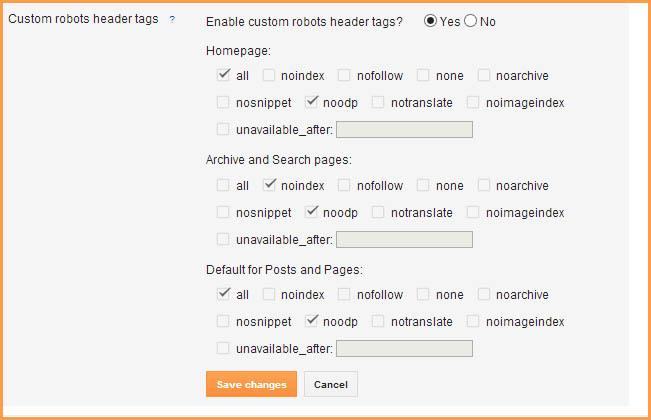
Step 1.  Log in to your blogger account Dashboard and click on your blog.
Step 2.  Go to Settings >> Search Preferences.
Step 3.  
Click on edit link in front of Custom Robots Header Tags and then click on Yes option.
Step 4. 
Once you click on the Yes you will see many options. Simply tick on the options as shown in the below image.
Best Custom robots header tags for blogger SEO Traffic

Step 5.  Now click on "Save changes" button and You are done!

That's all! If you have any doubt or need help about this post, please leave comment.

Tuesday, May 28, 2013

Custom Robots.txt file for Blogger/Blogspot blogs for SEO

Custom Robots.txt for blogger
Today I will show you How to Enable Custom Robot.txt File in Blogger for better SEO and search engine results?

Blogger now lets you edit your blog's robots.txt file. What are Robots.txt files, robots files are plain text files which instruct the search engines what to not index. Robot.txt is a way to tell search engines whether they are allow to index a page in the search result or not. The bots are automatic, and before they could access your site, they check the Robot.txt file to make sure whether they are allowed to crawl this page or not.

How to Enable Custom Robots.txt in Blogger


1. Blogger Dashboard >> Select Blog >> Select Settings tab >> Search Preferences

Robots.txt

2. Click on Edit in front of Custom robots.txt
3. Click on Yes and proceed to next step.
3. Next a box comes up and paste following given code.

User-agent: Mediapartners-Google
Disallow:

User-agent: *
Disallow: /search
Allow: /
Sitemap: http://YOURBLOGURL.blogspot.com/feeds/posts/default?orderby=UPDATED
4. and finally click on Save Changes button to save code.

I hope this tip would help you. If you are having any issue regarding crawling then, feel free to leave your questions in the comments below and I would try to help you in solving them.

Wednesday, May 1, 2013

Add SEO Meta Tags (Title and Description) in Blogger

SEO Meta Tags:

SEO Meta Tags:


Meta tags is a important things for SEO (Search Engine Optimization). The <meta> tag provides metadata about the HTML document. Meta tags will not be displayed on the page, but will be machine parsable. Meta elements are typically used to specify page description, keywords, author of the document, last modified, and other metadata. The metadata can be used by browsers (how to display content or reload page), search engines (keywords), or other web services. Google bots read meta tags of a site or blog and give these tags (title,keywords and description) information to google search engine, according to these tags your blog is showed in google search engine results pages (SERP's).

Meta Tags are most important and most useful for our blog's SEO. Also see updated post on Meta Tags

Put SEO Meta Tags in Blogger Template

Learn how to put Meta Tags in blogger template for better ranking in search engine results with easy steps.


Step 1.
Login to Blogger >> Go to Dashboard >> Template >> Edit Html

Step 2.
Find the following code [Tip: Ctrl+F]
<head>
This will be mostly on the main page of the template coding.


Step 3.
After/under this line paste the following code.
           <!-- Meta Tags ~  blogtipsuk.com  -->
 <meta content='Your Blog Description' name='description'/>
 <meta content='Keyword1,Keyword2,Keyword3' name='keywords'/>
 <meta content='Author Name' name='Author'/>
 <meta content='Author Email Address' name='Email'/>
 <meta content='all' name='robots'/>
 <meta content='index, follow' name='robots'/>
 <meta content='Language Name' name='language'/>
 <meta content='Country Name' name='country'/>
 <meta content='blogger' name='generator'/>
               <!-- /Meta Tags ~   blogtipsuk.com  -->

Step 4.
Change red color bolded text according to your choice.

Note:  write keywords in separate commas  i.e., write comma after every word.

Step 5.
Now save your template and you are done, your blog is optimized for SEO and Google will show your site/blog in search results

SEO Meta Tags in Google Search Engine Results Pages


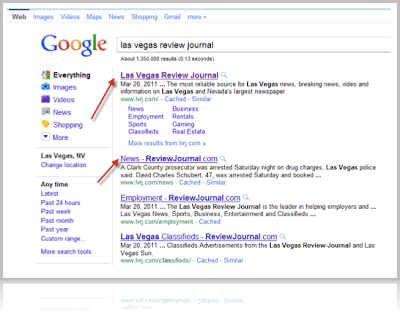
Your Blog's Title and Description Tag will look like this in Google Search.

Title and Description Meta Tags

Monday, April 15, 2013

5 Tips/Cara Menulis Artikel Blog Post SEO Friendly

SEO Trik

5 tips menulis artikel blog post yang seo friendly, bagi seorang Blogger menulis artikel atau postingan blog adalah sesuatu yang memang kewajiban, kebanyakan beberapa Blogger baru menginginkan blog mereka terlihat di halaman pertama Google tetapi mereka tidak mengetahui bagaimana cara agar bisa masuk dalam halaman pertama Google, selain beberapa tips yang pernah saya ulas sebelumnya seperti cara cepat blog terindex search engine, disini saya akan coba mengulas hal dasar (basic) bagaimana cara agar artikel blog yang kita buat lebih seo friendly.

Konten
Struktur Judul Post (Post Title) dan Post Description
Tautkan (Link) Keywords Yang Penting Ke Artikel/Halaman Lain
Konten yang Relevan (Relevant Content)
Konten yang Unik (Unique Content)
Gunakan Google Adwords Keyword Tool

Struktur Judul Post (Post Title) dan Post Description

Judul post adalah yang paling penting dan vital karena itu adalah sesuatu yang menggambarkan apa yang ada didalam artikel anda, dan hendaknya post title yang anda buat mengandung kata kunci (keywords) yang relevan. Cobalah mencari susunan kata (phrase) dan keywords yang banyak dicari orang dan sisipkan itu didalam judul post, tapi ingat.. relevansi tetap menjadi acuan,5 Tips Menulis Artikel Blog Post Yang SEO Friendly jangan memasukkan semua keywords didalam post title seolah-olah anda memajang semua kata kunci sehingga terlihat ngawur yang membuat pembaca bingung. Sama halnya dengan post description yang berupa ulasan singkat tentang artikel anda jadi diusahakan mengandung kata kunci dan frasa.

Tautkan (Link) Keywords Yang Penting Ke Artikel/Halaman Lain

Tautkan/link keywords yang penting ke halaman lain yang relevan dan sesuai dengan pembahasan didalam artikel yang anda buat, hal ini akan meningkatkan page views didalam blog anda dan juga akan mengalirkan pagerank.

Konten yang Relevan (Relevant Content)

Tetap jaga konten yang anda buat relevan dan sesuai dengan topik blog anda. Itu akan membuat mesin pencari seperti Google membantu anda untuk menaikkan ranking blog anda pada mesin pencarian sesuai dengan keywords yang anda pilih, seperti contoh pada blog saya ini bloggerpeer.blogspot.com mempunyai topik tentang tips trik Blogger dan tips trik SEO, jadi semua artikel yang saya buat mengandung beberapa kata kunci tersebut.

Konten yang Unik (Unique Content)

Anda harus berfikir kedepan dan pintar membaca situasi apa yang menjadi topik hangat dan trend saat ini sehingga bisa anda tuangkan dalam sebuah ide untuk membuat artikel sesuai dengan gaya dan style anda sehingga membuat artikel yang anda buat unik lain dari pada yang lain, search engine seperti Google sangat menyukai konten yang unik dan fresh, jadi tetaplah berkarya dan jangan melakukan duplikasi atau copy paste (copas) karena itu akan memperburuk ranking blog anda di mesin pencari.

Gunakan Google Adwords Keyword Tool

Kadangkala kita merasa kesulitan untuk mendapatkan kata kunci yang banyak dicari orang, maka anda bisa mencoba menggunakan alat yang dimiliki Google yaitu Google Adwords: Keyword Tool, dengan alat itu anda tidak perlu menebak tentang kata kunci terbaik karena tool dari Google tersebut mempunyai kumpulan kata2 kunci terbaik yang lagi trend dan banyak dicari orang.

Itulah 5 tips menulis artikel blog post yang seo friendly, kalau ada saran dan kekurangan mungkin bisa berbagi dan disampaikan melalui komentar.

Add Custom Error Page (Page Not Found) in Blogger

Custom Error Page (Page Not Found)

What is Error 404 Page ?

This page appears only

1. When a reader reaches to a page that does not exist or

2. Reader type wrong permalink for a post or page. This type of link is known as broken link or Custom Page Not Found or (Error 404 Page).


Also Read: How to Remove "Powered By Blogger" Attribution from Blogger

How to Add Custom Error Page (Page Not Found) to Blogger

Now you can create a Custom Error 404 Page (Page Not Found) for Blogger blog. This error page design i'm giving you is an idea only (which i use in my blogs). This error page gives the users message that page is not found or currently unavailable. It also has a link to Homepage of the blog and a Search box for users to search within your site. You can create a custom error page as per your blog design and creativity. 

Follow these steps to apply this error page on your blog or website.

1. Blogger Dashboard >> Select Blog >> Select Settings tab >> Search Preferences
2. Now under Error and redirections you can find Custom Page Not Found. Next to this there is an Edit option. Now click on this.
3. Next a box comes up and paste following given code

<h3>Your requested page was not found</h3>
<p>Sorry, we cannot find the page that you are looking for. It might have been removed, had its name changed, or is temporarily unavailable.<br/>
Please check that the Web site address is spelled correctly.</p>
<b>Other things to try:</b><br/>
<ul>
<li>Go to our <a href="/">home page</a>, and use the menus or links to navigate to a specific post.</li>
<li>
<form method="get" action="/search">
<table width="100%">
<tr>
<td><input type="text" style="width:95%;padding:2px;" value="Search this blog.." onfocus="if (this.value == &quot;Search this blog..&quot;) {this.value = &quot;&quot;}" onblur="if (this.value == &quot;&quot;) {this.value = &quot;Search this blog...&quot;;}" name="q"></td>
<td><input type="button" Value="Search"></td>
</tr>
</table>
</form>
</li>
</ul><br /><a href="http://bloggerseotipstraining.blogspot.com/2013/04/add-custom-error-page-not-found-in-blogger.html">Error Page from Blogger and SEO Tips</a>
 4. and finally click on Save Changes button to save code.

Now visit any page which is not a part of your blog e.g., ( www.yourhomepage.com/ssssss ) and see this beautiful error page working having a link to homepage and a search box.
If you have any question regarding this than comment down and ask, I'll try to answer your questions. Thanks.

Saturday, March 16, 2013

Write Best Post Title For Search Engine Optimization(SEO)

Today we're going back to basics! And nothing is more basically important to a site than properly written title tags. You know the ones that used to appear in the little blue bars in your browsers. Most modern browsers try to hide these, though that doesn't stop them being helpful!

So what is a title tag? Why is it important to SEO, and how do you write the darn things?

Meta Tags:


First let's talk about meta tags. Meta elements are HTML or XHTML elements used to provide information about a web page for the search engines and website users.

Such elements must be placed as tags in the head section of a HTML document. These elements are the:

  • Title Tag
  • Description
  • Keywords (No one uses these anymore and you can get spam "points" for overuse on Bing, so just forget them. If you have keyword stuffed "spammy" ones, you probably want to fix those.)

What is a Post Title Tag?

Title tags are part of the meta tags that appear at the top of your HTML inside the < head> area. Think of title tags like the title of the chapter of a book. It tells people and search engines what your page is about.

Title tags are also part of what makes people decide whether to visit your site when it shows up in the search results. The title tag should contain important keywords to help the search engine determine what the page is about.

Write title tags for humans; format them for search engines.

NOTE: Every experienced SEO has their own unique methods to doing this, so I'm going to give you best practices along with some of my methods. However, there are a million ways to write a title tag.

What Does the Title Tag Look Like?

The title tag looks like this in your HTML code:

<title>Important Words Go Here</title>

Here is how title tags appear in a browser that uses the bar to display title tags (other browsers might only use the tab space or not show them at all):
Title Tags in Browser Bar

Finally, here's where Google shows the title tag:

Title Tags in Google Search

REMEMBER: A title tag is THE MOST IMPORTANT SINGLE TAG in your page. It tells the search engines what your page is about. It is still vitally important to your SEO strategy.

Quick Checklist

When you're writing your title tag what do you need to know? Here's a quick checklist with some tips on how to write optimized title tags:

Length: Title tags should be a maximum of 70 characters long, including spaces.
Keyword Placement: Your most important words (keywords) need to be first in your title tag, with your least important words being last in the title tag (most to least). However, if you're working in a language that reads right-to-left, then it is reversed, and it would be least important to most important.
Keyword Separation: Use pipes | to separate important (keyword) phrases (no commas, underscores, dashes or any other punctuation unless the keyword is written that way).
Wording: Keep your important phrases short and simple. Leave out words that would make it read like a sentence. (e.g., and, if, but, then, etc.)
Company Name: If your company name is not part of the important (keyword) phrases, put it at the end of the title tag; if it is part of your important words, put it as the first words in the title tag. Some SEOs will tell you to leave it out. You can leave it in for branding purposes � so people will see the brand and click. This isn't valid for all sites.
DON'T DUPLICATE Title Tags: They must be written differently for every page. Don't mass replicate your title tags.
Make It Relevant: Title tags must be written to be descriptive of the content on the page. (e.g., the About Page would be:
About | Important Keywords | Company Name

or

Important Keywords | About Us | Company Name.

Google & Title Tags

Sometimes Google doesn't like your title tag. In fact, sometimes Google thinks it can pick a better one, so it will rewrite the tag for you. There are several places it might get this information, most of them you won't prefer to one you crafted yourself.

While there isn't any assurance your title tag won't be replaced, make sure you write a title tag that is page related, content descriptive, short and sweet, and not keyword stuffed. This is your one defense.

Keyword Stuffed Title Tags

You've probably come across badly written title tags that try to rank for everything or repeat a word over and over. Keyword stuffing is the worst offense when it comes to title tags.

Say your site is trying to rank for Blue Bells and Yellow Bells. Many times you will see the main keyword repeated multiple times across the title tag. It might appear like this:

Blue Bells, Yellow Bells, All Types of Bells | Bells Bells and More | Doors.com

This is bad title tag writing. You don't need to repeatedly write the keyword. Google especially can pick up the keywords like your eyes can read them, so you would best to rewrite this as

Blue & Yellow Bells | Doorbells | Doors.com

We removed the extra words, combined the products (if possible you would split these products to separate pages, a blue and a yellow, but this isn't always feasible or desirable) and added a category keyword which would appear in the middle of the title tag on all doorbell related page titles, then end it with the domain name (again this is for branding purposes � there are also good reasons to not do this, it depends on the SEO).

Now our title tag is short, sweet, simple, and to the point. We have also categorized it and added in branding for good measure.

We also took out the word "and" and replaced it with an ampersand (&) so that you don't accidentally relate the two items and make Google think you want people who are looking for Blue AND Yellow Bells.

And there you go, a basic lesson in title tag writing. This can be the most challenging and fun part of any SEO's work! Or should that be "Inbound Marketer's" work?

Some Title Tag Writing Examples

Let's look at a few examples of writing title tags with actual examples.

If your important words (keywords) were "Charlie Sheen" and "Winning" your title tag would be written in that order:

Charlie Sheen Winning

Charlie Sheen would be the first words in the tag.

Now what if we had more than one set of words? What if my keywords were "Charlie Sheen Winning" and "Tiger's Blood"? Your title tag would still be written with "Charlie Sheen Winning" as the first words in the tag. Then you would add a pipe | and "Tiger's Blood" as the second phrase:

Charlie Sheen Winning | Tiger's Blood

Don't use hyphens, underscores, commas or any other type of character � just pipes.

Now what if we had more than one set of words and a company name we were not worried about optimizing for (the company name was not part of the reputation issue). If my words were "Charlie Sheen Winning" and "Tiger's Blood" and "CBS", you would separate these three phrases with pipes, with CBS last and farthest from the beginning, which Google sees as the least important phrase:

Charlie Sheen Winning | Tiger's Blood | CBS

The company name can be repeated in every title tag as long as it as not part of the important words and appears at the far right end of the title tag.

What about sentences? Couldn't you just write a sentence such as "Charlie Sheen Says Winning And Tiger's Blood And Gets CBS Riled Up"? You could, but those extra words like "says", "and", and "riled", dilute your important words and make them less important to content, so best to keep it short, simple, and clear. Leave out the extra words.


Title Tag Writing Pop Quiz!

When using strict SEO principles. Which are the BEST title tags for the important (keywords): (pick 2) "Charlie Sheen" "Winning" "Howard Stern Show" when optimizing (trying to rank for) the words "Charlie Sheen (1) Winning (2)"


  1. Charlie Sheen Winning on the Howard Stern Show
  2. Howard Stern Show & Charlie Sheen | Winning
  3. Charlie Sheen is Winning Points on the Howard Stern Show
  4. Charlie Sheen | Winning | Howard Stern Show
  5. Charlie Sheen and Howard Stern Winning the Show
  6. Winning | Charlie Sheen on the Howard Stern Show
  7. Charlie Sheen Winning | Howard Stern Show


Doesn't matter as long as the words are all there

If I were writing this, the correct answer would be No. 4.