Friday, March 13, 2015

Domain Authority?


Matt Cutts� announcement heralds the end of an area, really, because quick-fire guest blogging was one of the last vaguely acceptable techniques by which one could quickly manipulate rankings. While Google�s tougher stance has got some online marketers upset, others have applauded Cutts for tightening up this final area in which wild-west-SEO�ers could ply their trade. Now, almost for the first time since the birth of the internet, the playing field has begun to level out. Webmasters who put time and effort into their design, online communities and content creation are going to set the standard from now on.

What is domain Authority?
Domain authority is a measure of the power of a domain name and is one of many search engine ranking factors. Domain authority is based on three factors: Age, Popularity, and Size.

SEO gurus Moz can be credited with the metric known as DA or domain authority. Moz�s own search algorithm gauges the quality of any given site based on a huge complex combination of factors including onsite and offsite, taking in to account things such as diversity of Backlinking domains to come up with a score between 0 and 100. A brand new site, for example, will have 0 whereas a very high authority site might have 80/100. Domain Authority gives those working in the field of online marketing a useful metric by which to consider the apparent quality of any site.

Do read it here: http://codeboxr.com/blogs/why-domain-authority-is-most-important-for-seo-3

Saturday, November 15, 2014

SEO Meta Tags for Every Post in Blogger

SEO Meta Tags for Blogger Post
SEO Meta Tags are most important and useful for our blog's SEO. Meta tags are added to tell search engines what that page is all about. Most important meta tags are the Title and Description of a page. Only these two tags are included in search engines results with site link obviously. As blogs and sites have more than one pages i.e., a blogger blog normally have following pages. Blog home page , post pages, static pages, Labels and archives.

So we cannot use same meta tags for all our pages. Because every page have different content with unique Title and Description. So it is our duty to add different meta tags that perfectly defines our pages to the Search Engines if we want to rank high in the search results.

If we use same meta tags to all of our blog posts, our blog search engine rankings and traffic will be decreased. But, if we add different unique meta tags to different Blog posts, it will make the search engines to know more about our individual blog posts and make them crawl and index our pages better and it also improves our Search engine rankings for sure :)

Well this is the importance of unique meta tags for unique pages. Now lets learn about adding them in your site.

Add Meta Tags for Every Post in Blogger

There are many ways to do this. I'll write each step but the first one is my favourite and I recommend you to apply this method.

Step 1.  Change your blogger settings

Login to Blogger Dashboard >> Select Blog >> Select Settings tab >> Search Preferences

Now Enable search description to Yes.

Write your blog description in the box, it should be limited to 150 characters. Click on Save Changes Button.

Now whenever you create a new post, there will be option for Search Description on the right side. You can write a brief description of every post you are writing. 
(This option will be visible after changing search description setting to �Yes� as described above).

Now we just have to add following code in HTML to add these in our blog.

Go to Blogger Dashboard >> Click Template tab >> Click Edit HTML

Find the following code [Tip: Ctrl+F]
<head>
After/under this line paste the following code.
           <!-- Meta Tags ~  blogtipsuk.com  -->
 <b:if cond='data:blog.metaDescription != &quot;&quot;'>
<meta expr:content='data:blog.metaDescription' name='description'/>
</b:if>
 <title><data:blog.pageName/> - <data:blog.pageTitle/></title>
               <!-- /Meta Tags ~   blogtipsuk.com  -->
Now Save Template. Your blog posts will now have Title and Description that you wrote while creating your post.

Step 2. Add blogger pages HTML codes

This step is a little tricky. Why? Because you have to add the HTML codes of blogger pages one by one. Just see the code below that can be used to add meta tag for your blog home page URL.

Go to Blogger Dashboard >> Click Template tab >> Click Edit HTML
Find the following code [Tip: Ctrl+F]
<head>
After/under this line paste the following code.
<b:if cond='data:blog.url == data:blog.homepageUrl'>
 <meta content='Your Blog Description' name='description'/>
<title>Your Blog Title</title> </b:if>
Your blog homepage will now have Title and Description that you wrote in this code in place of RED color. Now Save Template. 
You can add other page codes as well see full codes here HTML codes for all blogger pages

Step 3. Add meta tags with URLs

You can add meta tags with specific URLs as well. Just write your desires URL and give that URL specific Title and Description. 

Go to Blogger Dashboard >> Click Template tab >> Click Edit HTML
Find the following code [Tip: Ctrl+F]
<head>
After/under this line paste the following code.
<b:if cond='data:blog.url == &quot;Write URL of page&quot;'>
 <meta content='Your page Description' name='description'/>
<title>Your page Title</title> </b:if>
Your blog page will now have Title and Description that you wrote in this code in place of RED color. Now Save Template.

Remember some points


1. Apply only one method. Because writing multiple tags will be of no use. 
2. Google and all other Search Engine Bots only take those meta tags in their system which come on top the site i.e., if you have multiple title tags then only one title will be taken by bots which in on the most top.
3. You can see your HTML code by pressing [CTRL + U] , just open your blog link and press CTRL + U this will open your blogs page source. and your html site will open.

Need any assistance, don't hesitate to comment down. Have a good day!

Sunday, October 26, 2014

Social Media and SEO Ranking Factors

I observed traffic and rankings to my personal SEO blog after penguin 3.0 update I have got extreme changes.

SEO ranking factors
Here are the techniques I have applied in 2014 to my BlogSpot blog.
  1. Monthly updating blog posts
  2. Content optimization (internal linking for long tail keywords)
  3. Sharing post on social media sites Google plus, Facebook, Twitter, Pinterest, Stumbleupon, Delicious and Linkedin.
Suggestions to get good traffic and ranking to your website in search results.
On Page Checklist & Techniques

  1. Add your website in Google webmaster tools and register Google analytics
  2. Proper redirects (Make sure your website URL�s everything with www)
  3. Update XML Sitemaps for Images and videos.
  4. Update robots.txt
  5. Write Meta tags for all pages (Title and description only)
  6. Write H1 and ALT tags
  7. Put schema code for your website official logo.
  8. Update internal linking to your unique and quality content
  9. Check and fix broken links
  10. Create custom 404 pages
Read more �

Saturday, October 18, 2014

External Linking


�Did you know that an external links going out to these high authority sites can boost your site SEO? When search engine spiders crawl your site and see a link and follow it to BBC or Huffington Post, they weight it as a positive. The trick is to find organic ways to link to these sites.�

Monday, September 1, 2014

Google talk direct download link


Even though Google Talk app has updated to HANGOUTS, You can download the old version from right here .>> 

 Here is a download directly from Google: http://dl.google.com/googletalk/googletalk-setup.exe

Friday, August 22, 2014

How to do Minijobs in NeoBux

how to start mini jobs in NeoBux
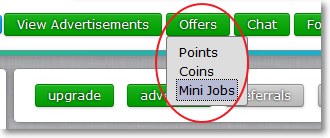
Basically, Mini Jobs are small and simple tasks for which you get instantly credited into your main balance. To access this feature, sign up to neobux just click on the "Offers" button on the top, then select Mini Jobs.

Earn Money with NeoBux Minijobs complete Guide

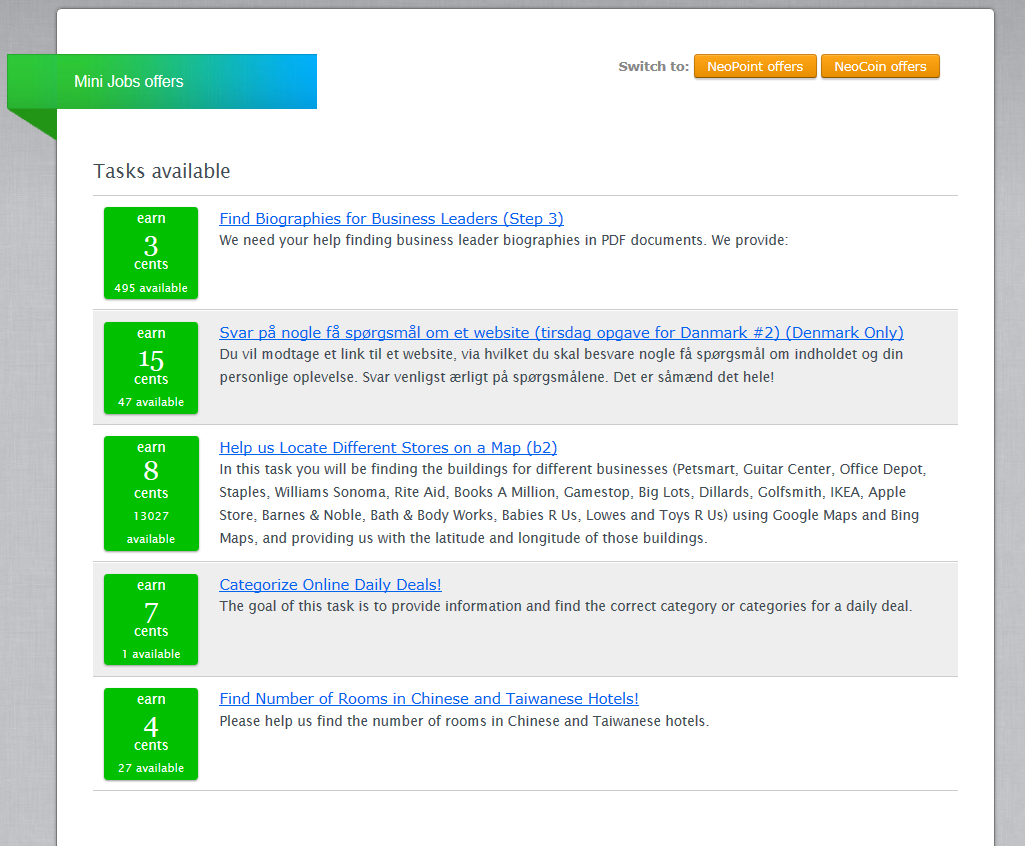
Some tasks will appear for you to choose. The number of jobs displayed may vary from time to time, as well as the types. You can also see the number of available tasks and their pay rates. Some example minijobs in NeoBux.


minijobs in neobux


If you are a new member of neobux without any referrals (complete guide), the earning from Mini Jobs can be more and easier than clicking ads.

The objective of the available Mini Jobs is to solve problems ranging from data collection and product categorization to business lead verification, content generation / modification and academic research.

If it�s your first time you will be presented with the training mode. You must complete this phase in order to gain payment. Review carefully on the instructions too, each task will have their own procedure to follow. After you have understand what to do, begin to complete the selected task as instructed. Detailed instructions about what exactly your work will be are available on screen, what you need is to follow these details to accomplished the Mini Jobs under a certain time. If you want to end current task or change task, click on the Give Up button on the top.

Do not give random answers. A number of false answers higher than a Mini Job�s accuracy threshold may prevent you from completing a Mini Job.

Bonus:Mini Jobs will grant you a commission from your direct referrals earnings and will provide you with a productivity bonus for your own work.

For each $1 you earn from doing Mini Jobs you'll get a 12% bonus as a standard member and a 24% bonus as a golden member.
You�ll earn 12% from each of your direct referrals earned by completing Mini Jobs.

Some questions you may ask:

There's no Mini Jobs to do?
The availability of Mini Jobs depends on multiple factors like the current needs of the offers� providers and demographical criteria, but this doesn't mean new Mini Jobs won't appear in the near future. You only need to visit the Mini Jobs section frequently to catch one of the new assignments as they come and go.

My answers have been marked as wrong, but they were clearly correct.
If you feel that their system has treated you unfairly, then be sure to contest the question on the feedback page.
You may also send them a clear and concise explanation of the problem using the "File a ticket" link by clicking the "listing" button at the top-right inside any Mini Job�s interface and selecting "help".

What happens if I get flagged or banned?
CrowdFlower�s system can flag or ban you from a single Mini Job or from all the Mini Jobs if you repeatedly submit a number of wrong answers higher than a Mini Job�s accuracy threshold.
If you consider their decision as unfair, you�ll need to contact CrowdFlower�s support directly.

For more information, you can visit: FAQ  > Offers > Mini Jobs

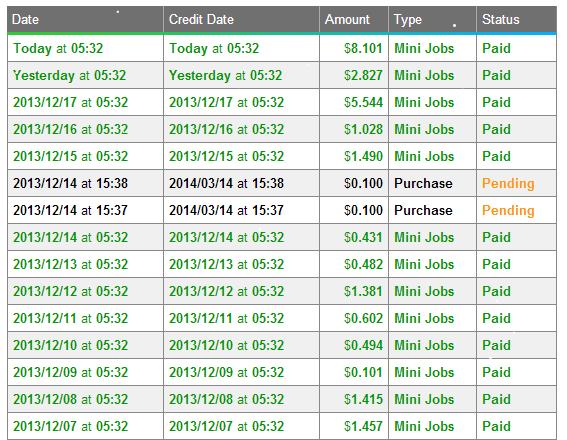
Take a look at my NeoBux minijobs Earnings.
my neobux minijobs Earning

How to get more Minijobs in NeoBux

Some people are earning around 2-3 dollars even if they haven't got any active referrals.
And one of the key is the MINIJOBS.
But when you're in some regions and countries minijob offers are less appearing
than other members from United states and U.K.

Like members from the Pakistan, Philippines, well If you are looking for solutions, there is one.
I know, many members doing this most of the time to earn faster than clicking those
worthless ads worth 0.001 dollars.

This trick is legal, and Neobux wont ban you doing this.
Here is what I'm talking to.

TUNNELBEAR
Just download the link where your device is capable of running.
This application will change your Internet Protocol Address to other I.P. around the globe.
They offer UNITED STATES, CANADA, UNITED KINGDOM, JAPAN, and I guess
DENMARK i.ps also belongs here.

It is a VPN or virtual private network that use to hide your IP and change it to a different
Internet Protocol.
You can also use any other software.

There is an on and off feature so you can change it on what suits your time. So when you
use this you can notice that there are a lot of offers in the minijob section. where you can
earn lots of cents in a single task alone.

Remember: 

You can only use this trick to do Minijobs but not for Clicking advertisements.
If you do so Neobux might ban you. Just turn the application off so that you wont risk your account.

Thursday, August 21, 2014

Dynamic URLs vs Static URLs


Issue:

Websites that utilize databases which can insert content into a webpage by way of a dynamic script like PHP or JavaScript are increasingly popular. This type of site is considered dynamic. Many websites choose dynamic content over static content. This is because if a website has thousands of products or pages, writing or updating each static by hand is a monumental task.

There are two types of URLs: dynamic and static. A dynamic URL is a page address that results from the search of a database-driven web site or the URL of a web site that runs a script. In contrast to static URLs, in which the contents of the web page stay the same unless the changes are hard-coded into the HTML, dynamic URLs are generated from specific queries to a site's database. The dynamic page is basically only a template in which to display the results of the database query. Instead of changing information in the HTML code, the data is changed in the database.

But there is a risk when using dynamic URLs: search engines don't like them. For those at most risk of losing search engine positioning due to dynamic URLs are e-commerce stores, forums, sites utilizing content management systems and blogs like Mambo or WordPress, or any other database-driven website. Many times the URL that is generated for the content in a dynamic site looks something like this:

   http://www.somesites.com/forums/thread.php?threadid=12345&sort=date

A static URL on the other hand, is a URL that doesn't change, and doesn't have variable strings. It looks like this:

   http://www.somesites.com/forums/the-challenges-of-dynamic-urls.htm


Static URLs are typically ranked better in search engine results pages, and they are indexed more quickly than dynamic URLs, if dynamic URLs get indexed at all. Static URLs are also easier for the end-user to view and understand what the page is about. If a user sees a URL in a search engine query that matches the title and description, they are more likely to click on that URL than one that doesn't make sense to them.

A search engine wants to only list pages its index that are unique. Search engines decide to combat this issue by cutting off the URLs after a specific number of variable strings (e.g.: ? & =).

For example, let's look at three URLs:

   http://www.somesites.com/forums/thread.php?threadid=12345&sort=date
   http://www.somesites.com/forums/thread.php?threadid=67890&sort=date
   http://www.somesites.com/forums/thread.php?threadid=13579&sort=date

All three of these URLs point to three different pages. But if the search engine purges the information after the first offending character, the question mark (?), now all three pages look the same:

   http://www.somesites.com/forums/thread.php
   http://www.somesites.com/forums/thread.php
   http://www.somesites.com/forums/thread.php

Now, you don't have unique pages, and consequently, the duplicate URLs won't be indexed.

Another issue is that dynamic pages generally do not have any keywords in the URL. It is very important to have keyword rich URLs. Highly relevant keywords should appear in the domain name or the page URL. This became clear in a recent study on how the top three search engines, Google, Yahoo, and MSN, rank websites.

The study involved taking hundreds of highly competitive keyword queries, like travel, cars, and computer software, and comparing factors involving the top ten results. The statistics show that of those top ten, Google has 40-50% of those with the keyword either in the URL or the domain; Yahoo shows 60%; and MSN has an astonishing 85%! What that means is that to these search engines, having your keywords in your URL or domain name could mean the difference between a top ten ranking, and a ranking far down in the results pages.

Solution:

So what can you do about this difficult problem? You certainly don't want to have to go back and recode every single dynamic URL into a static URL. This would be too much work for any website owner.

If you are hosted on a Linux server, then you will want to make the most of the Apache Mod Rewrite Rule, which is gives you the ability to inconspicuously redirect one URL to another, without the user's (or a search engine's) knowledge. You will need to have this module installed in Apache.This module saves you from having to rewrite your static URLs manually.

How does this module work? When a request comes in to a server for the new static URL, the Apache module redirects the URL internally to the old, dynamic URL, while still looking like the new static URL. The web server compares the URL requested by the client with the search pattern in the individual rules.

For example, when someone requests this URL:
   http://www.somesites.com/forums/the-challenges-of-dynamic-urls.html

The server looks for and compares this static-looking URL to what information is listed in the .htaccess file, such as:

   RewriteEngine on
   RewriteRule thread-threadid-(.*)\.htm$ thread.php?threadid=$1

It then converts the static URL to the old dynamic URL that looks like this, with no one the wiser:
   http://www.somesites.com/forums/thread.php?threadid=12345

You now have a URL that only will rank better in the search engines, but your end-users can definitely understand by glancing at the URL what the page will be about, while allowing Apache's Mod Rewrite Rule to handle to conversion for you, and still keeping the dynamic URL.

If you are not particularly technical, you may not wish to attempt to figure out the complex Mod Rewrite code and how to use it, or you simply may not have the time to embark upon a new learning curve. Therefore, it would be extremely beneficial to have something to do it for you. This URL Rewriting Tool can definitely help you. What this tool does is implement the Mod Rewrite Rule in your .htaccess file to secretly convert a URL to another, such as with dynamic and static ones.

With the URL Rewriting Tool, you can opt to rewrite single pages or entire directories. Simply enter the URL into the box, press submit, and copy and paste the generated code into your .htaccess file on the root of your website. You must remember to place any additional rewrite commands in your .htaccess file for each dynamic URL you want Apache to rewrite. Now, you can give out the static URL links on your website without having to alter all of your dynamic URLs manually because you are letting the Mod Rewrite Rule do the conversion for you, without JavaScript, cloaking, or any sneaky tactics.

Another thing you must remember to do is to change all of your links in your website to the static URLs in order to avoid penalties by search engines due to having duplicate URLs. You could even add your dynamic URLs to your Robots Exclusion Standard File (robots.txt) to keep the search engines from spidering the duplicate URLs. Regardless of your methods, after using the URL Rewrite Tool, you should ideally have no links pointing to any of your old dynamic URLs.

You have multiple reasons to utilize static URLs in your website whenever possible. When it's not possible, and you need to keep your database-driven content as those old dynamic URLs, you can still give end-users and search engine a static URL to navigate, and all the while, they are still your dynamic URLs in disguise. When a search engine engineer was asked if this method was considered "cloaking", he responded that it indeed was not, and that in fact, search engines prefer you do it this way. The URL Rewrite Tool not only saves you time and energy by helping you use static URLs by converting them transparently to your dynamic URLs, but it will also save your rankings in the search engines.