Saturday, May 11, 2013

How to remove Blogger Navigation Bar?

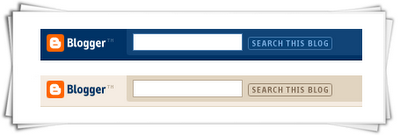
Blogger Navigation Bar

In every blog there is a blogger default navigation bar (nav bar) of the above style. This nav bar make your blog look less professional. These navigation bars can be removed using a simple CSS one line code.

Also read: Remove Subscribe to: Posts (Atom) Link on Blogger

Removing Blogger Deafult Nav Bar


Apply these steps to remove the Blogger Navigation bar / Blogger Nav Bar.
Steps:

  • Log-in to your blog
  • Template >> HTML >> Proceed
  • Search For this code  ]]></b:skin>   (tip: Use CTRL+F)
  • Now Just above/before  ]]></b:skin>   insert following code

#navbar-iframe,#navbar { display: none !important; }

Save your template and view your blog. Blogger Navigation Bar will no longer be there.

Thursday, May 9, 2013

Social Bookmarking List 2 -May 2013


Social Bookmarking List  updated may 2013..


dailybookmark.asia
goodbookmark.asia
bookmarktool.asia
autobookmark.asia
thaibookmark.asia
SharedBookmark.asia
secondbookmark.asia
ReligiousBookmark.asia
fastbookmark.asia
flashbookmark.asia
greatbookmark.asia
bookmarks24.asia
gpsbookmarks.asia
online-bookmark.asia
submitbookmarks.asia
BookmarkPay.asia
Vbookmark.asia
BookmarkOne.asia
magicbookmark.asia
bookmarkking.asia
bookmarks4you.asia
bookmarkhelp.asia
bookmarkzone.asia
InfoBookmark.asia
bookmarkingdemo.asia
bookmarkengine.asia
bookmarknews.asia
ultimatebookmark.asia
bookmarkingstation.asia
hugemoney.asia
moneytruck.asia

For more Social Bookmarking lists and SEO tricks click here: SEO TIPS AND TRICKS

Tuesday, May 7, 2013

New Google Update Brewing for May 2013 ??

There are some very early signs of a possible Google update brewing as of early this morning. A Webmaster World thread has some renewed chatter around an update.
Note, most of the WebmasterWorld thread is about April 15th changes, which people say have to do with the Boston bombings and seasonal traffic changes. But last night, early this morning, two webmasters came in and said they saw major shifts in rankings and traffic.


A preferred WebmasterWorld member said he saw a 77% drop just yesterday. Others said "some thing big is underway," after noting drops in his keyword ranking.

SERPs.com reports pretty significant changes in he Google results on Monday. SERPMetrics.com shows very little change in the search results. MozCast has not yet updated with results from Monday but they showed changes on Sunday, which seem off.
It is very early and nothing is confirmed - but there may be signs of a possible Google update. What exactly, is still unknown and unconfirmed.


Friday, May 3, 2013

Customize Google Plus URL

Google plus doesn't have personalized user names in profile URLs for instance, for profiles or pages, you cannot have a uniform resource locator like plus.google.com/username, , as you'll be able to on Face book and Twitter. What you have got instead is plus.google.com/4568779852 .Now we can customize google plus url with the help of Gplus.Google is highly popular social media, and is very helpful for bloggers and webmasters, Google services, like Blogger, Google AdSense, Google Webmaster Tools, and so on. Google is good in several respects. 
 

Google-Plus-Custom-URL
Customize Google Plus URL


GPlus is url shortening service used for Google plus. With Gplus we can get a personalized user name for your profile like gplus.to/username. Log into your Google plus account, and click on on the down arrow next to your profile image within the top-right region of your screen. Now, you'll be able to see the ID in your address bar.

Take this ID, and go to Gplus within the Nickname, kind within the username you wish to use and paste your ID within the ID field, and click on add make sure to kind in mere your ID numbers, and not any slashes (/) or the other a part of your profile address. User names will entirely be between 3-25 characters. The process for customizing page address is that the same as for profiles. Claim your own user name currently before somebody else scoops it up.

Thursday, May 2, 2013

Social Bookmarking List 1 - May 2013

Social Bookmarking List-May 2013


Bookmarkdemon.asia
Bookmarkprofit.asia
Officialbookmarking.com
Officialbookmarking.info
Manualsocialbookmark.asia
Robobookmark.asia
Socialbookmark4u.asia
Bookmarkbacklinks.asia
Bookmarkblast.asia
Socialbookmarkingprogram.asia
Socialfurious.asia
Socialwide.asia
Socialcharm.asia
Bookmarkalive.asia
Buzzbookmarkacid.asia
Socialhell.asia
Socialslow.asia
Socialfuzzed.asia
Scienceleft.asia
Socialcash.asia
Socialmoneyexpensive.asia
Socialmoneywilling.asia
Moneybend.asia
Socialclass.asia
bookmark-site.asia
sitebookmark.asia
SeoBookmark.asia
publicbookmarking.asia
Onebookmark.asia
newbookmark.asia
dailybookmark.asia

Wednesday, May 1, 2013

Add SEO Meta Tags (Title and Description) in Blogger

SEO Meta Tags:

SEO Meta Tags:


Meta tags is a important things for SEO (Search Engine Optimization). The <meta> tag provides metadata about the HTML document. Meta tags will not be displayed on the page, but will be machine parsable. Meta elements are typically used to specify page description, keywords, author of the document, last modified, and other metadata. The metadata can be used by browsers (how to display content or reload page), search engines (keywords), or other web services. Google bots read meta tags of a site or blog and give these tags (title,keywords and description) information to google search engine, according to these tags your blog is showed in google search engine results pages (SERP's).

Meta Tags are most important and most useful for our blog's SEO. Also see updated post on Meta Tags

Put SEO Meta Tags in Blogger Template

Learn how to put Meta Tags in blogger template for better ranking in search engine results with easy steps.


Step 1.
Login to Blogger >> Go to Dashboard >> Template >> Edit Html

Step 2.
Find the following code [Tip: Ctrl+F]
<head>
This will be mostly on the main page of the template coding.


Step 3.
After/under this line paste the following code.
           <!-- Meta Tags ~  blogtipsuk.com  -->
 <meta content='Your Blog Description' name='description'/>
 <meta content='Keyword1,Keyword2,Keyword3' name='keywords'/>
 <meta content='Author Name' name='Author'/>
 <meta content='Author Email Address' name='Email'/>
 <meta content='all' name='robots'/>
 <meta content='index, follow' name='robots'/>
 <meta content='Language Name' name='language'/>
 <meta content='Country Name' name='country'/>
 <meta content='blogger' name='generator'/>
               <!-- /Meta Tags ~   blogtipsuk.com  -->

Step 4.
Change red color bolded text according to your choice.

Note:  write keywords in separate commas  i.e., write comma after every word.

Step 5.
Now save your template and you are done, your blog is optimized for SEO and Google will show your site/blog in search results

SEO Meta Tags in Google Search Engine Results Pages


Your Blog's Title and Description Tag will look like this in Google Search.
Title and Description Meta Tags

Sunday, April 21, 2013

Social Bookmarking List 3 - April 2013

Social Bookmarking List _April 2013


Newnewsformobile.com
Recentinsurance.com
Creatinsurance.info
Followinsurance.info
Recentinsurance.info
Bookmarkingtools.com
Seobookmarkingtools.com
Seobookmarktools.com
Seobookmarktools.info
Sciencebookmarking.asia
Bookmarkingtool.asia
Seobookmarktool.asia
Ebaysciencesite.asia
Easyseotool.asia
Studiesforum.asia
Deathexpress.asia
Socialbookmarknet.com
Socialbookmarknet.info
Socialbookmarkgenuis.asia
Socialbookmarkpage.asia
Advancedbookmark.asia
Atbookmark.asia
Onlinebookmark.asia
Easysocialbookmark.com
Easysocialbookmark.info
Antisocialbookmark.asia
Anysocialbookmark.asia
Onlineseobookmark.com
Onlineseobookmark.info
Bettersocialbookmark.asia
Ezsocialbookmark.asia
Acrosssocialbookmark.asia
Addsocialbookmark.asia
Bookmarkingbuzz.com
Bookmarkingbuzz.info
Bestsocialbookmark.asia
Esocialbookmark.asia
Fastsocialbookmark.asia
Freesocialbookmarker.asia
Hotsocialbookmarker.asia
Learnsocialbookmark.asia
Onsocialbookmarker.asia
Prosocialbookmark.asia
Seosocialbookmark.asia
Makemoneyactive.asia

You can get more SEO updates from freeseotricks-tips.blogspot.com