Starting from iOS 14, Apple will be displaying privacy information of each app available on the Apple App Store. iOS 14 offers the much-needed privacy notices in easily understandable language. With iOS 14’s new privacy feature, you can easily find out what data the app uses to track you, or what data the app will have access to.
So, Apple has introduced a much-needed privacy feature. However, Android doesn’t have this feature natively, but Android users can install an app known as ‘Exodus’ to review all installed apps.
The Exodus app for Android displays all the trackers that the app is using to track you. Not only that, but Exodus also helps you to find out all kinds of permissions that the app has been granted by default. So, Exodus is an app that helps you to know which trackers and permissions are embedded in apps installed on your device.
Know Which Apps are Using Trackers To Track You
So, in this article, we are going to share a detailed guide on how to use Exodus on any Android smartphone to know how much data the app is seeking from you.
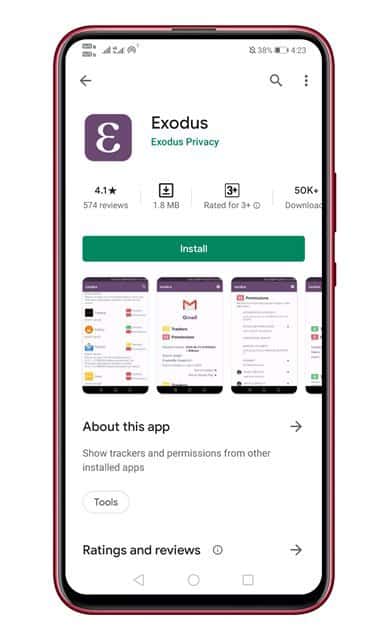
Step 1. First of all, download & install Exodus on your Android smartphone.
download & install Exodus on your Android
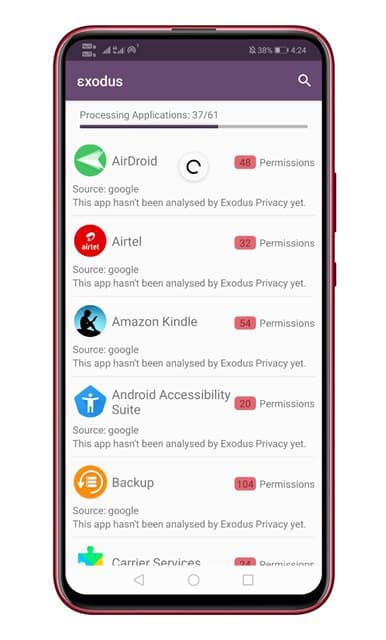
Step 2. Once done, open the app and wait until the app gathers the information.
wait until the app gathers the information
Step 3. Once done, click on the app whose details you want to find out.
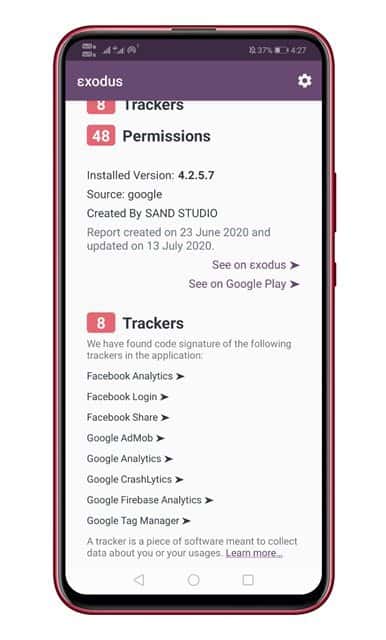
Step 4. Here we have picked Airdroid, which is a popular file-sharing tool. The app uses eight trackers to track you. It tracks your Facebook Login, Facebook Analytics, Google Admob, etc.
Trackers used by the app
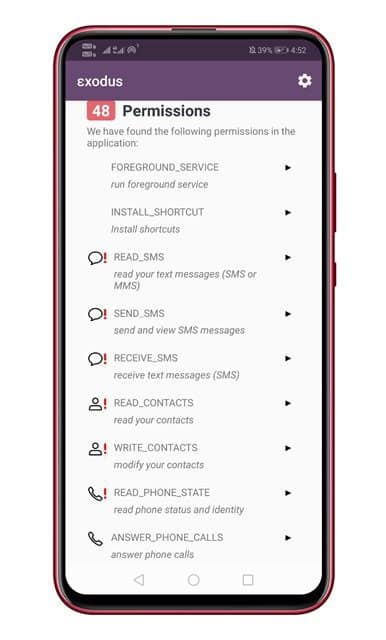
Step 5. Scroll down to see the list of permissions that the app has been granted by default. The app has been granted with 48 permissions, including the Read SMS, Send SMS, Write Contact, Access Network State, Change WiFi State, etc.
list of permissions that the app has been granted
In this way, you can review all apps installed on your Android. This will allow you to understand how much data the app is seeking from you.
So, this article is all about how to know which apps is using trackers to track you on Android. I hope this article helped you! Please share it with your friends also.
TikTok’s U.S. General Manager Vanessa Pappas has posted a video message to the platform that appears to be a response to reports from Friday that President Trump is working on an effective “ban” of the app in the U.S., a plan he shared with reporters from the White House pool on board Air Force One. Whether or not he’s even able to do this remains an open question, but in the meantime TikTok seems keen to reassure U.S. users it doesn’t intend to change its operational plans in response to this vague, but potentially existential threat.
The message from Pappas was pushed out to all U.S.-based users on TikTok as a notification, and appears on their discover page, making it clear they want this seen by the entire community. It starts by thanking users on the platform, and highlights some of its U.S.-based contributions, namely the jobs it has created to date, and committed to creating in future, and the fund it has set up to support creators in the U.S. and globally.
Pappas ends by asserting that TikTok is “here for the long run,” and calling for community support to “stand for TikTok.”
Trump’s assertion that he plans to sign an order as early as Saturday to bar U.S. access to the app followed reports that Microsoft is in talks with the company’s China-based owner ByteDance to potentially acquire its U.S. business. Trump appeared to discount any support for that possibility in his comments to the White House press pool, but a new report from Saturday morning said that Microsoft is indeed in talks to acquire a stake in TikTok and take over stewardship of its U.S. user’s data, as part of a potential deal to stave off any ban.
Again, it’s not clear what executive powers would actually allow Trump to put in place a U.S.-wide ban of the application, but it looks like ByteDance is working with parties in the U.S. on a deal that assumes he’d be able to do so unless the Chinese company divests entirely its U.S.-based TikTok operations to an American owner.
A 15-year digital media veteran, Sean Clayton connects brands with the data-driven intelligence solutions they need to drive growth.
With more than 90 major advertisers and counting announcing plans to dump Facebook, a significant question lingers: Where will brands go next for their digital marketing needs?
The case for the breakup is clear: Brands want to distance themselves from third-party business practices that do not align with their values. Specifically, they are disenchanted by what even some members of Congress are calling Facebook’s “lackadaisical” approach to enforcing community standards, allowing an epidemic of paid political misinformation and hate speech to persist on the user-driven platform.
However, with Google, Facebook and Amazon representing just under 70% of global digital ad revenue, a clean break from the tech giants is easier said than done. Advertisers, like anyone facing a breakup, must look within. After all, they don’t want to make the same mistakes and they cannot just throw newly freed up advertising dollars at a new social network ad platform, where similar conflicts could easily follow.
With introspection, advertisers will see that this is more than just a war on disinformation and hate speech. A data war is brewing, pressuring businesses to diversify data sources. As brands compete to understand the needs and preferences of today’s consumers, consumers are concurrently responding with more guarded protection of their online data.
To win this war, brands must reclaim data autonomy and infuse their digital media strategy with more diversified data. But they cannot do it alone and they cannot do it within the current system.
Time to brandish holistic data
Whether Facebook adjusts its community standards to appease dismayed advertisers has yet to be seen. But in the interim, as advertisers walk out the door, it’s worth noting that Facebook’s reliance on online data may soon be obsolete anyway.
One of the key differentiators for Facebook’s ad platform has been its ability to help level the playing field for smaller brands by cost-effectively captivating the right audiences. But the platform primarily draws insights from audiences’ behaviors online. The next wave of data-based marketing must employ tools that blend first-party data and qualified third-party data to offer a holistic view of customer behaviors, both online and offline.
Offline data sets, which include location intelligence, interactions, purchase history, contact information and demographics are lynchpins in the next digital media wave because they allow brands to develop a more human view of consumer data and create meaningful marketing moments. For example, location intelligence, an extremely potent tool that is currently helping brands pivot during COVID-19 disruptions and is even protecting public health, can drive personalized, alluring marketing campaigns with massive ROI opportunities.
The leading integrated data providers are managing extremely rich datasets, which increase in value daily as consistent tracking yields higher quality data. Such powerful and enriched data stacks offers brands visitor insights based on a specific location after an ad is interacted with on any device — requiring no guesswork for the marketing team. Brands are able to pinpoint exactly which messages resonate with which segments of their audience at which time. This precision ultimately helps them craft the right message for the target consumer — and deliver it at the exact right moment.
Marching orders for combat
Brands want to cut Facebook loose but where do they go next? How do they achieve data autonomy and make omnichannel strides in digital marketing? If the boycott movement is to succeed, revolutionary changes to the digital marketplace are needed.
A newly imagined system must be organized outside the proprietary grasp of any one single tech conglomerate. Otherwise, advertisers will lack ownership of the data they need to reach new audiences. Or they’ll once again get mixed up with similar paid political disinformation and hate speech across user-generated platforms, sending them straight back into the arms of Facebook.
Rather than rely on a single centralized social media platform, transparent media partners and publishers must come together on a shared central system that takes an omnichannel approach to building lookalike (LAL) audiences. A LAL puts advertisers in front of new audiences by finding users that, while they may be unfamiliar with their brand, are very similar to the buyer personas of their current customers. The LAL for each advertiser would be constantly tested and refined to keep pace with the rapidly changing marketplace.
Facebook currently operates on a LAL model but it is almost exclusively generated by online data from their users. The next step is expanding on this model and infusing offline and third-party data with a company’s first-party data, putting them in front of a LAL across a range of media partners and platforms. This will help build a core conversion audience, while constantly scaling new LALs for each brand.
Such a system would require collaboration, enlisting many players in a co-op style undertaking. For example, to get it off the ground, it would be helpful if about 20 of the large brands boycotting Facebook invest some of their newly freed advertising dollars to establish the data and publisher sharing co-op network.
Once the advertiser framework is set, the co-op would need to identify media outlet partners such as news websites, blogs, apps, podcasts and social media outlets. The co-op would negotiate a performance-based publisher relationship for every player, effectively increasing content monetization for publishers’ content channels.
Reinventing the digital media landscape
This would be a transformational movement, galvanizing brands with data autonomy and increasing customer engagement across an entire network of media platforms — not just one platform. Each advertiser’s first-party data, which they’ve already given to Facebook, would be analyzed to isolate data overlaps within the co-op. This would essentially lay the foundation for building a core conversation audience, helping each advertiser tap new LALs.
Brands advertising with the co-op would gain access to more enriched, robust insights on consumers than Facebook could ever offer, leading to a higher return on investment for the $336 billion spend on digital advertising annually.
Most importantly, it would help brands future-proof their digital marketing efforts and grant them greater freedom in choosing where their advertising dollars are being spent.
Let’s admit, the technology around is evolving at a rapid pace and the entire tech industry is undergoing rapid transitions. Each and every other day, we hear about new gadgets, new technology, etc. These days, it’s quite easy to stay updated with the latest technology trends because there are plenty of tech news sites and apps available on the web.
Since we now use smartphones more often than computers, it makes sense to share the list of best tech news apps. For Android users, we have compiled a list of best tech news apps that you can install right now. With these apps, you can watch news videos, read the news, watch live news, etc.
Best Tech News Apps For Android in 2020
Not only that, but some apps listed in the article also allows users to bookmark or save a webpage for offline reading also. So, let’s check out the best Android apps to read tech news.
Well, Medium is not exactly a tech blog or tech news app as it covers other sections as well. What makes Medium different from all other is that it lets you share your own views on what’s happening around the world. Here you can follow topics of your interest like Gadgets, Science, Tech, etc to read the most recent news.
Well, Appy Geek is made by the same tech enthusiasts behind the Tech Republic – another best tech news app. Talking about the Appy Geek, the interface of the app is pretty amazing, and it gathers tech news from different popular sources. So, it generally gathers popular tech content from all around the world and assigns it at one place. So, Appy Geek is another best tech news apps that you would love to have.
It is an RSS reader app that allows users to subscribe to favorite tech blogs. So, when you open the app next time, you will see the content from the sites that you have subscribed to. Feedly makes things a lot easier because you don’t need to open the browser and visit the website to view news as it automatically lists all news that has been recently published by various tech blogs. Apart from that, Feedly also got a dark mode, light mode, and a reader mode which improves the reading experience.
Well, Drippler is much different compared to all others listed in the article. The app basically focuses on delivering tips and tricks based on what smartphone you are using. It detects your smartphone and then shows you the most personalized tips and tricks. Apart from that, it also shows the most important and trending tech news topics from around the world
Well, Tech News Tube is something like an RSS Reader app because it lets users subscribe to different tech websites. After subscribing to the tech website, it automatically lists all articles published by those portals. The best thing about Tech News Tube is its interface which looks clean, and it’s really simple to use. Not just that, but Tech News Tube also offers a dark mode that works as a reading mode.
Well, if you are searching for an Android app to read hacking related news, then Hacker News might be the best pick for you. The app’s primary focus is to provide news articles related to hackers or hacking. On this app, you can read security news, technology news, hacking news, etc.
Well, Flipboard is one of the popular sources to view the latest news. Not just technology Flipboard covers almost every category of news. Talking about the technology news, the app is filled with a plethora of information and interesting tech articles that are worth to read. So, Flipboard is another best tech news apps that you can install right now.
Well, TechCrunch is one of the popular portals that reports on the business of technology, startups, venture capital funding, and Silicon Valley. With TechCrunch Android app, you can browser and read all TechCrunch’s headlines. The app also provides users customization options to see topics of their own choice.
Well, this is another app from the CNET news portal. Tech Today is designed to be as simple and minimalist as possible. It’s even lightweight than the CNET app that’s listed above. It’s basically a tech news app that delivers a selection of best stories based on the most popular topics right now.
It’s a relatively new news app available on the Google Play Store. The app is not much popular, but it’s pretty consistent on providing tech news. Findups Daily covers tech news content of popular news portals like Gizmodo, CNet, Slashdot, Engadget, Wired, The Next Web, TechCrunch, etc.
It another best News & Magazine app that you would love to have on your Android smartphone. The best thing about Opera News is that it collects trending topics and videos from different sources and organized them in one place. With Opera News, you can read the latest and most popular news articles on the economy, finance, technology, business, etc.
Well, Google News simply organizes what’s happening in the world to help you learn more about the stores that really matter to you. What’s more interesting is that Google News adapts with your browsing and reading habits to show relevant suggestions.
It is one of the most unique news apps that Android users would love to have. The app collects news from multiple national & international news sources and summarises them to present in 60 words or less format. So, it basically generates a shorter version of trending news which makes it convenient to read the news on mobile.
It is a viral news magazine app for Android available on the Google Play Store. The Android app curates the trending and interesting topics from all over the internet and presents them through creative images, Gifs, and videos. If we talk about the tech news, Inpix covers top tech news of the day. Not only that but on Inpix, you can also discover lots of interesting tech facts, tech videos, etc.
If you are searching for an Android app to read trending and breaking news from all around the world, then you need to give Scooper News a try. Guess what? Scooper News provides users a personalized news feed containing breaking news, tech news, etc. Apart from that, Scooper News also has lots of tech-related videos as well.
So, these are the best tech news apps which you can use on your Android smartphone. I hope this article helped you! Share it with your friends also.
As we all know, everyone loves to play games on their Android device. That’s why more than millions of users now prefer to buy gaming smartphones that can handle heavy games. Almost every other day, new smartphone pop-ups in the market, and so does the Android games.
There’s one thing that always bothers Android users – Game Lags. It doesn’t matter how powerful your phone is, if it wasn’t optimized for gaming, then you will experience lags and reboots while playing high graphics games. So, in this article, we have decided to share a few best methods to boost up Gaming Performance on Android.
Boost Up Game Performance In Your Android
The methods were quite straightforward and easy, and you will just need root access and an app that will help you to modify some system settings to boost gaming performance.
Update Your Android Smartphone
Update Your Android Smartphone
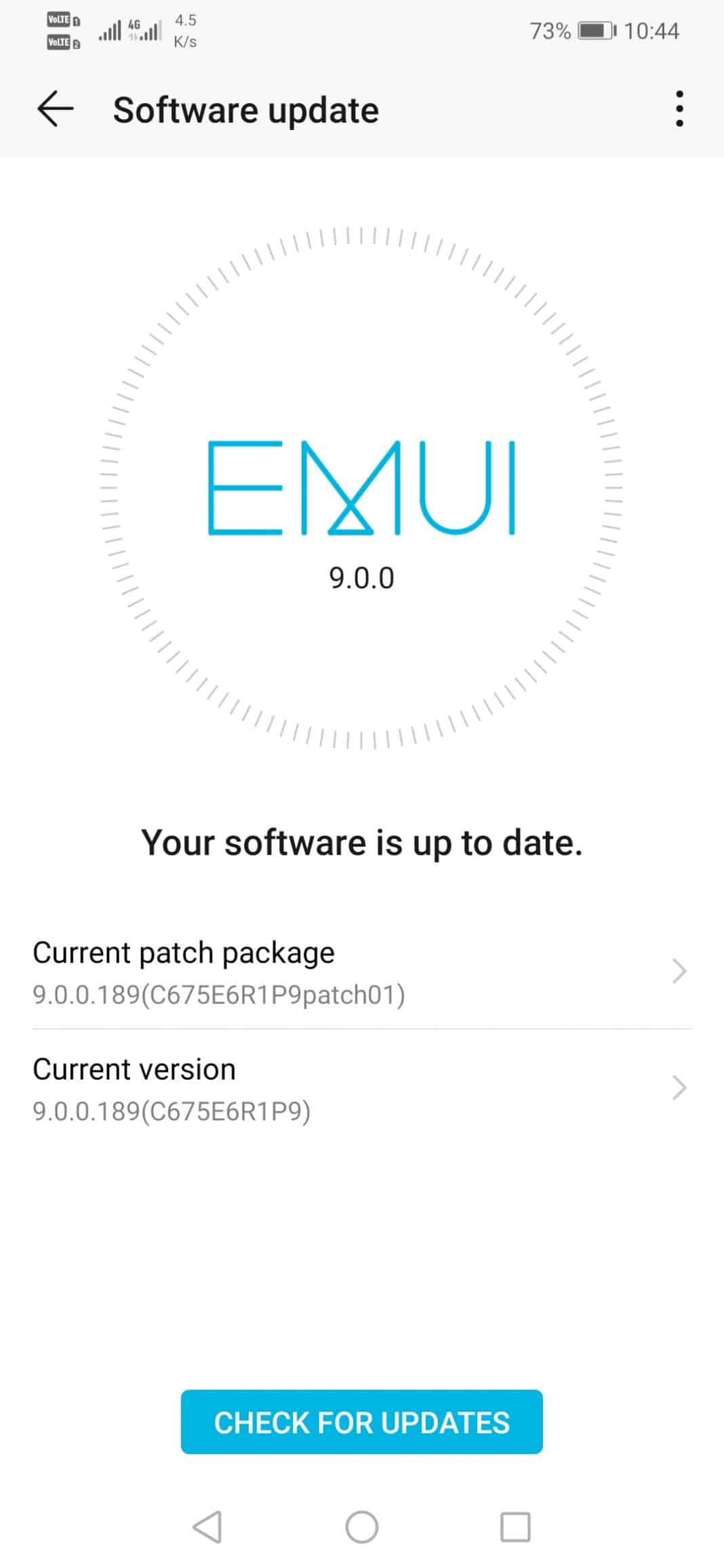
Just like a Windows operating system, Android also has few bugs which lead to performance degradation. However, the good thing is that Android receives frequent updates consisting of bug fixes and security patches. These updates often provide stability to the Android leading to better performance. So, before following the next method, make sure that your phone is up to date with the latest software.
Turn Off Background Services
Turn Off Background Services
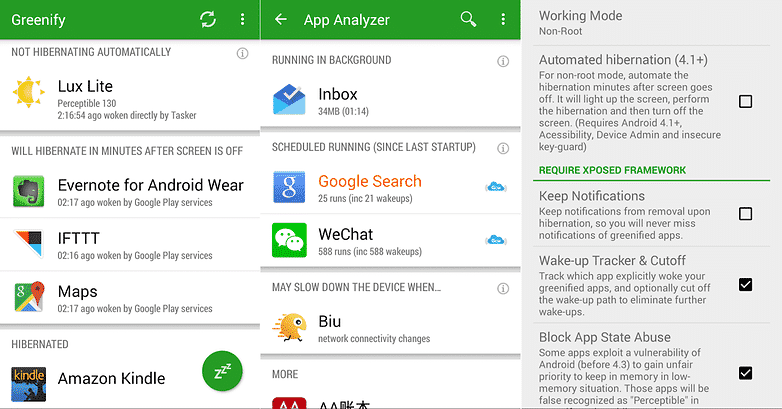
Well, just like our computer, our Android smartphones also runs lots of process and apps on the background. Usually, these background services do nothing apart from just consuming the CPU and RAM resources. Therefore, before playing any game, make sure to turn off Background services. You can install any Android junk cleaning app or task manager apps to identify apps and services running on the background. This way, you will get a better gaming experience. You can read our article on which we have discussed some of the best task manager apps for Android.
Use Lite Apps
Use Lite Apps
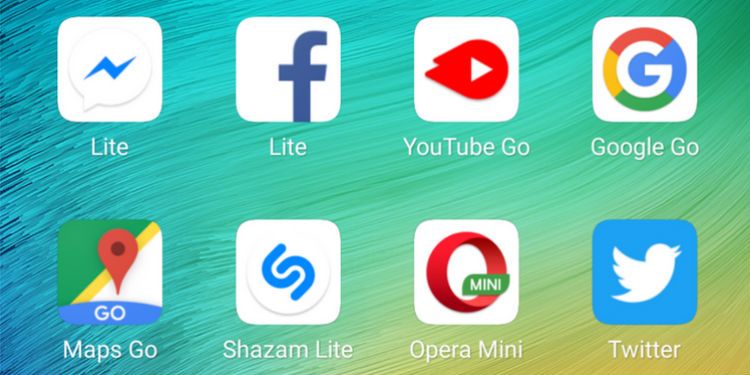
As we all know, smartphones having better storage technology performs better when it comes to gaming. However, storage like UFS 2.1 is now seen only on high-end devices. UFS 2.1 provides better read and write speed which leads to better gaming performance. However, not everyone has a capable smartphone, so, they need to manage the storage. You can easily save some extra storage by installing the Lite version of Popular apps. Apps like Facebook Lite, Messenger Lite, Twitter Lite, YouTube Go, provides the same features, but they need less space to install.
Using GL Tool
Step 1. First of all, you need a rooted Android, and if you don’t have that you can refer our quick guide to easily root android mobile.
Step 2. Now after rooting your android mobile, you will need an Android app that is GlTools (Graphic Optimizer)the Android app that boosts the graphics performance of your mobile.
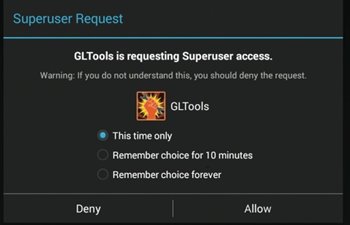
Step 3. Now once you installed this app launch it and this app will ask you to grant the superuser access.
grant the superuser access
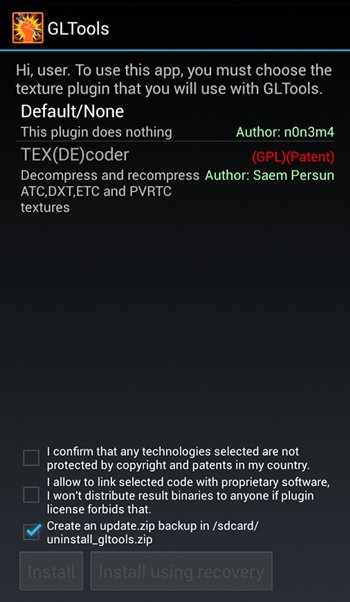
Step 4. Now you need to add a little plugin to make this app work, and for that, you can select TEX(DE)coder there.
Select TEX(DE)coder
Step 5. Now it will start getting the, and after that, you just need to agree to the terms and then simply install the downloaded plugin, and now your device will get rebooted to make this app proper changes.
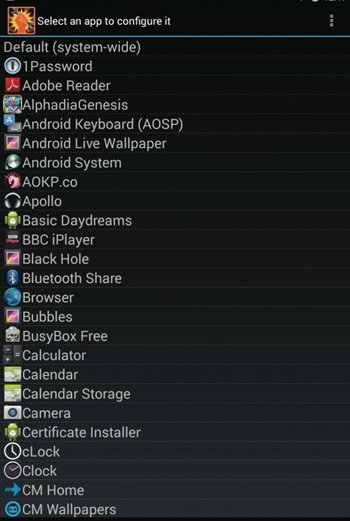
Step 6. Now after reboot launch the app and you will see all the apps that are installed in your android. Select the app whose performance you want to boost up, you can choose any of the games.
Select the App/Game
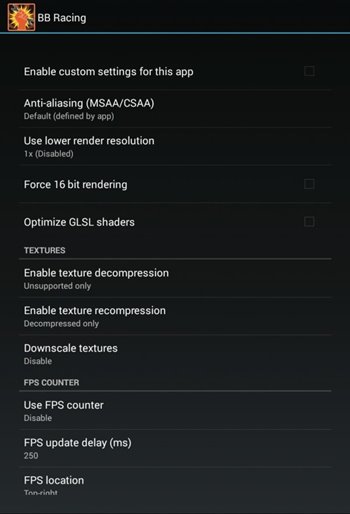
Step 7. Now you will see lots of options, and you just need to set them according to your wish. These settings will force your device to bring up the best performance of your device. You can also alter the GPU Name/Emulation and many other settings.
How To Boost Up Game Performance In Your Android
That’s it! You are done, now try to run the game, and you will feel the difference you have made.
Using Android Developer Option
Android comes pre-loaded with many features. There is an option of Force 4x MSAA in Android developer options that needed to be enabled. Let me tell you MSAA stands for multi-sample anti-aliasing.
Step 1. First of all, you need to enable the Developer option. For that simply open the Settings screen and then under About phone option you need to tap on “Build Number” 4-5 times. You will see the developer option.
Step 2. Now open the developer option.
Open the developer option
Step 3. Now you need to find the option “Turn on 4x MSAA”. You need to enable it.
Enable ‘Turn on 4x MSAA’
That’s it! You are done. Now open up any game, and it will run smoothly. However, this feature drains your battery life. Things might vary in different apps and devices.
Turn Off Animations
Well, Animations are important because it provides a better Android experience. If you have a less capable smartphone, then you need to turn off the animations to achieve better gaming performance. To turn off animations on Android smartphone, follow the method given below.
Window Animation & Transition Scales
First of all, open Settings and then select ‘Developer Options’. Now on the Developer options, search for the ‘Drawing’ option. There you need to modify the three options – Window Animation Scale, Transition animation scale, Animator duration scale. Set all those to – 0.5x
Expanding the RAM of your Android smartphone
Well, as we know we can tweak our Android devices. Similarly, we can also expand our Android’s RAM and by increasing the RAM of our smartphone we can automatically achieve greater speed while playing games. To expand RAM on your Android smartphone, follow this tutorial
Step 1. To start, you need to download and install Roehsoft Ram Expander on your Android smartphone. However, you need to have a rooted Android smartphone to use this app. If you are looking for a rooting guide, this article might help you.
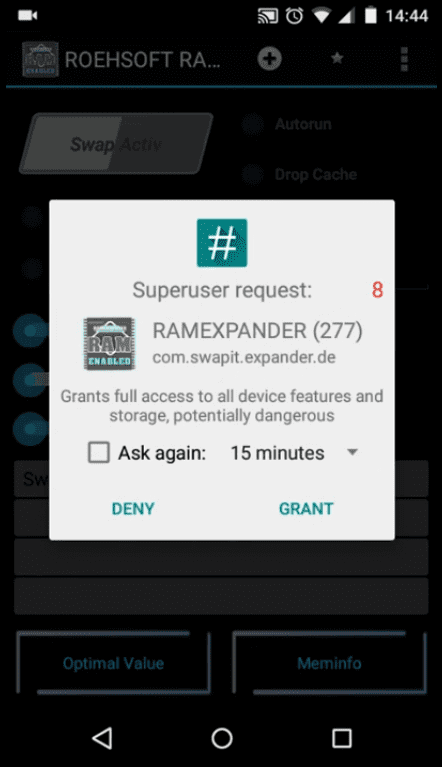
Step 2. Now install the app and grant the superuser permission.
grant the superuser permission
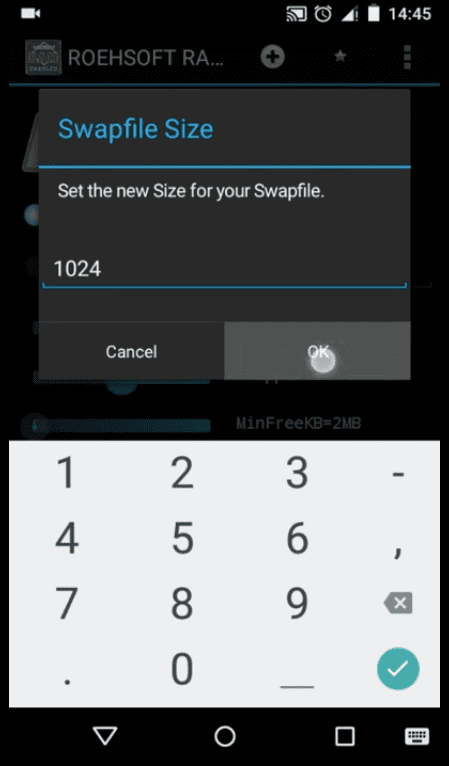
Step 3. Now you will get to see a few options like SDCard Memory, Total Free RAM, etc. There you need to set the new size for your swapfile.
Select the new SwapFile Size
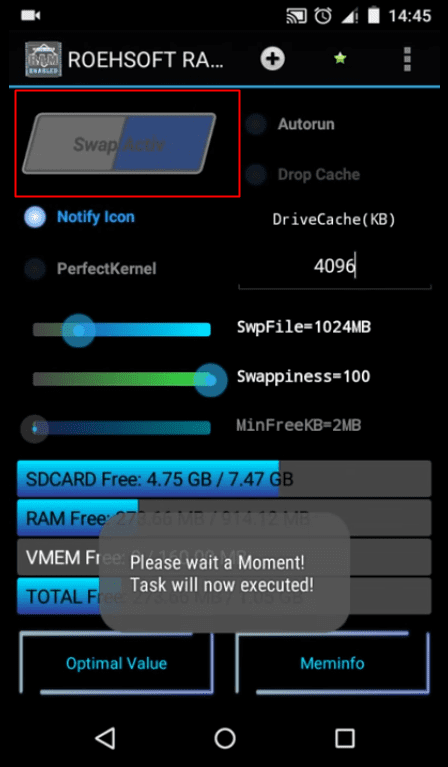
Step 4. Now you need to swipe over ‘Swap/Active’ and wait for a moment until the swap is executed fully.
Swipe over ‘Swap/Active’
Step 5. In the next step, you need to select the path or partition for the swap file. Here you need to select your SD card.
Step 6. Press the back button and then on the main page, you need to swipe over ‘Swap/Active’ and wait for few seconds.
Swipe over ‘Swap/Active’
That’s it, you are done! This is how you can use Roehsoft to increase your Android RAM. Increasing your Android’s RAM will probably boost gaming performance.
Game Booster Apps
There are few best Android apps available on the Play Store that can boost gaming performance. Below, we have shared some of the best Android apps to boost gaming performance in 2020.
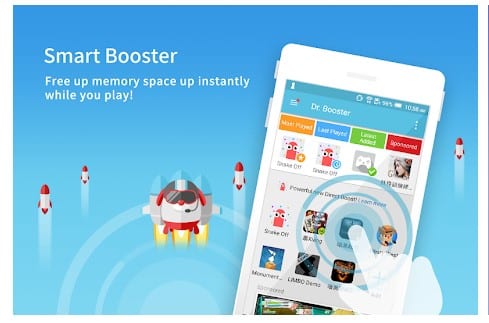
This app smartly frees up memory space (RAM) to boost your phone, speed up Android game apps, and detect malware, so your favorite games—as well as over 70,000 other apps—run faster and smoother!
The reason why this app is listed here is that this had very positive user rating and reviews in Google play store. This app works. You don’t need to do anything simply install the app and games will be automatically loaded into the app. Simply, start the game and enjoy the game in boosted-speed.
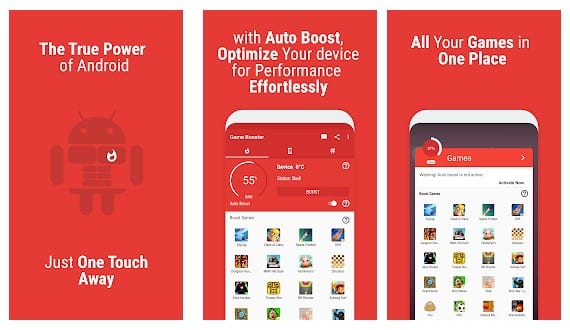
You can use the Game Booster app to unleash the real performance of your Android device. With GameBooster you can boost your device’s performance with just one touch. You can optimize the CPU, RAM and many other things automatically using the Game Booster Android app.
GameBooster optimizes your device for gaming with a background service. It takes the advanced Linux CPU management under control and gives you max performance with just one touch!
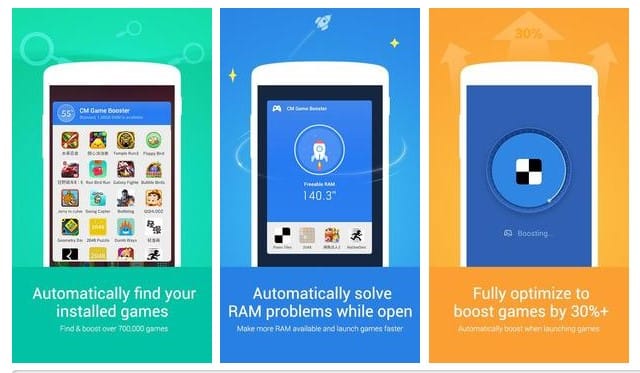
When it comes to Game boosting, nothing can beat CM Game Booster. This is one of the best Android apps you can have on your Android smartphone. The App packs lots of features for game management and speed boosting. Users just need to tap the app once to fix the problems with game lag and insufficient memory.
So, this article is all about how to Boost Up Game Performance In Android. I hope this article helped you! Share it with your friends also.
Well, if you have been reading tech news for a while, then you might be well aware of the iOS 14. Apple introduced the iOS 14 previous month, and it brings in a wide range of features and privacy options. One of the most prominent features introduced with iOS 14 is SMS filtering.
SMS filtering is a messaging feature that automatically puts spammy texts, OTPs, and other promotional messages in a separate folder. In this way, iOS 14 offers users a much cleaner messaging interface. The new SMS filtering feature drastically improves the messaging experience of a user.
Get iOS 14’s SMS Filtering on Android Device
The SMS Filtering feature is not present in the Android mobile operating system, but you can install a third-party app to filter texts automatically. So, in this article, we have decided to share a working method to filter text messages automatically.
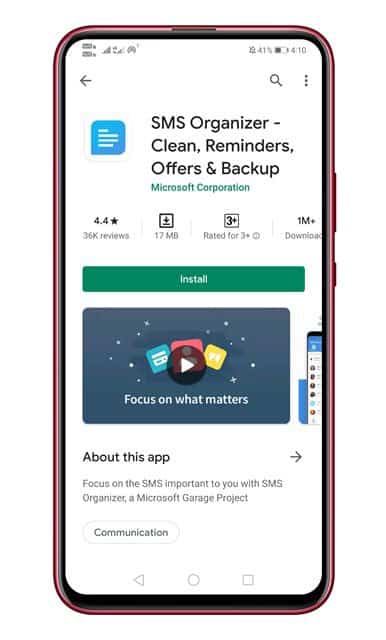
Step 1. First of all, download & install the SMS organizer app on your Android smartphone.
install the SMS organizer app
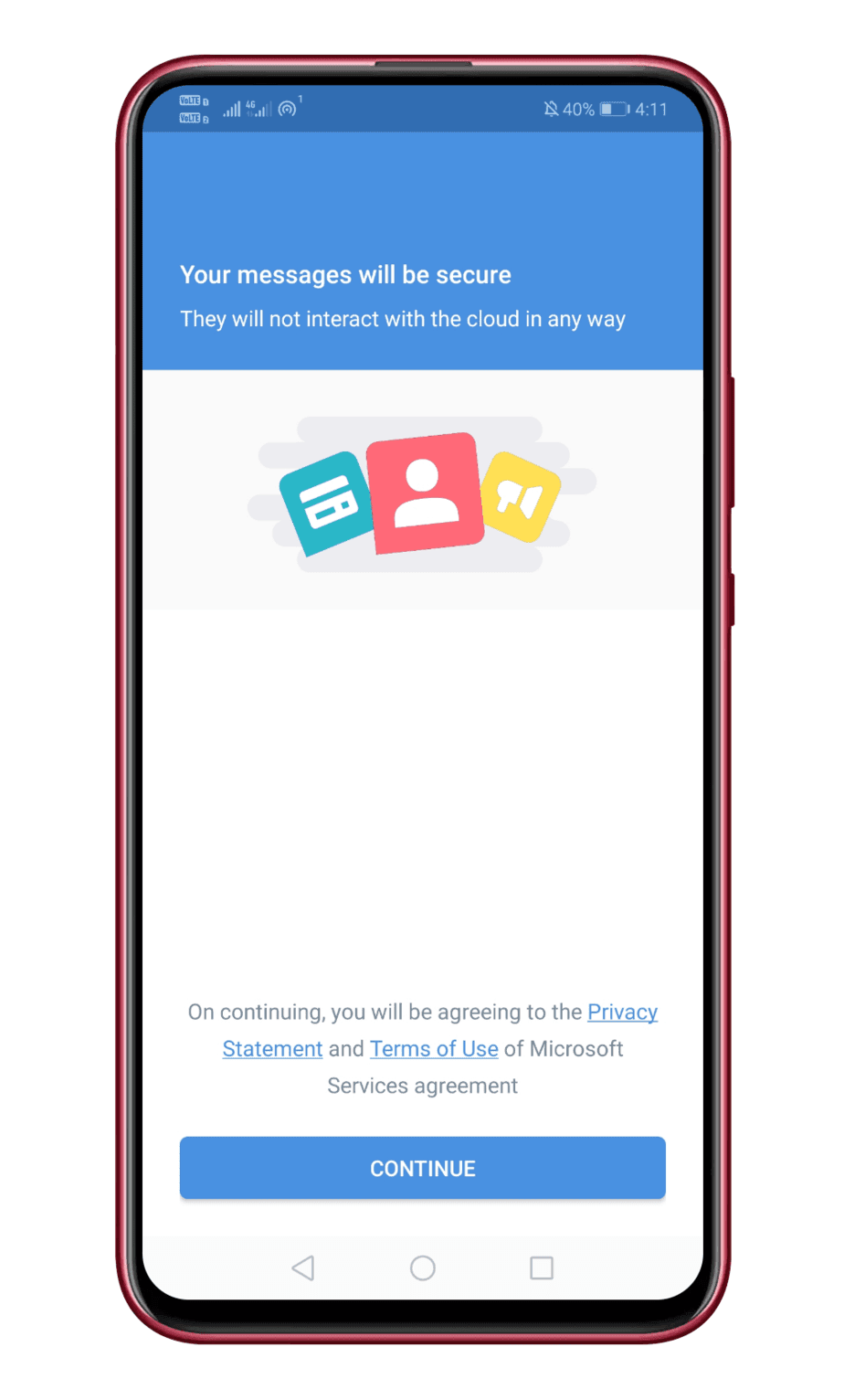
Step 2. Once installed, open the app from your App drawer. Next, tap on the ‘Continue’ button.
Tap on the ‘Continue’ button
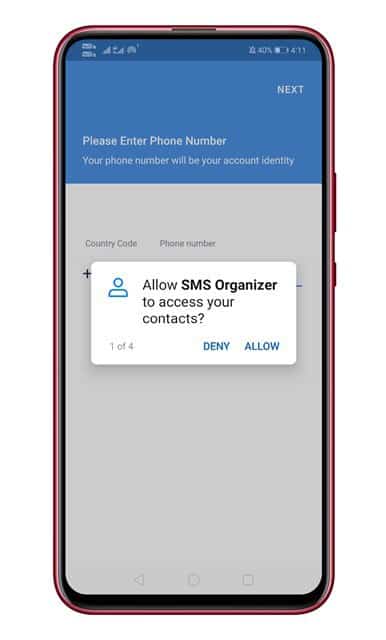
Step 3. Now you will be asked to grant a few permissions. Make sure to grant every permission that the app asks for.
grant a few permissions
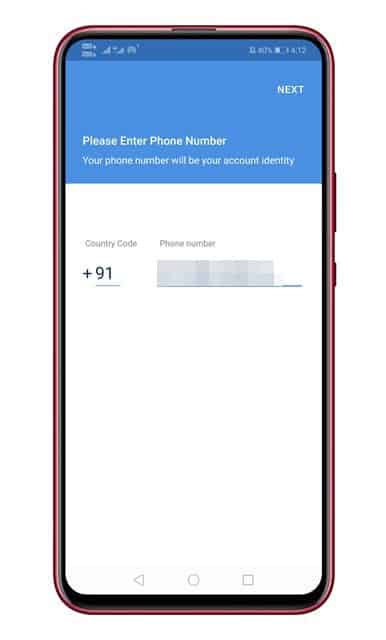
Step 4. In the next step, you would be asked to verify your phone number.
verify your phone number
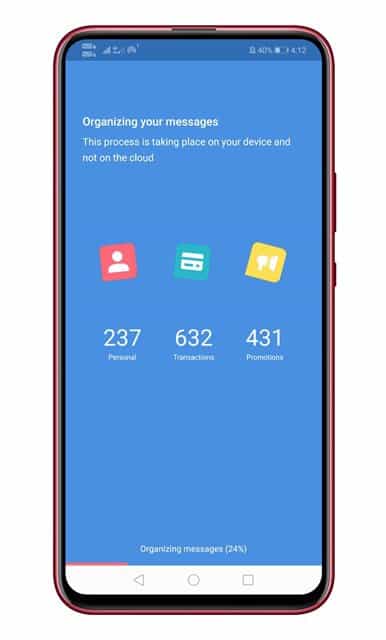
Step 5. Now upon the startup, it will organize the SMS. Wait until the app organizes all your SMS. Once done, tap on the ‘Get Started’ button.
Tap on the ‘Get Started’ button
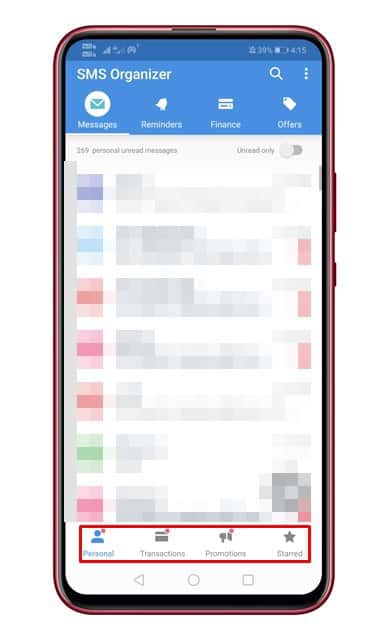
Step 6. Once done, you will now see the main interface of the app. From the bottom, you can pick the ‘Transactions’ and ‘Promotions’ tab to see the SMS.
SMS Filters
That’s it! You are done. This is how you can get iOS 14’s SMS Filtering feature on Android.
So, this article is all about how to get iOS 14’s SMS Filtering feature on any Android. I hope this article helped you! Please share it with your friends also.