
If you are facing lag, or slow response time while working on windows 10, then you should check your task manager to know whether you are facing such an issue because of 100% disk space used.
Task Manager provides you with multiple information including CPU uses, disk uses, RAM uses and all the other details regarding processes, which is currently running on your machine. 100% disk space is used is the most common error in Windows 10. Most of the user face this error because of outdated drivers and windows, follow the below instructions to solve it.
Different Ways To Solve Windows 10 Error 100% Disk Space Is Used
1. Restart Your System
Restarting a system may solve different types of error, including windows 10 error 100% disk space is used. Just remember you should restart your system, not Shut Down it because Restart will start your PC with the new state. Mostly Restarting will solve it, check the task manager, if you still facing the problem, then you have moved to a new solution.
2. Update Windows
Windows 10 Updated my solve different types of problems. It is better to be updated all the time. You will highly recommend you to keep your windows updated all the time; an error like 100% disk space is used will solve by updating windows.
To Update Windows
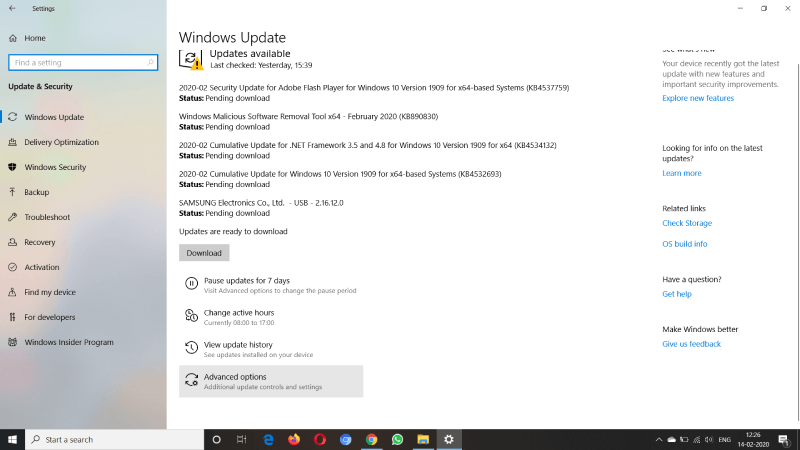
- First of all, go to settings
- Click on the Update & Security option.
- Here you will see the all the available updated, otherwise, click on Check Update
- Download & Install it.
3. Check For Malware
If you use the Internet on your PC, then you make sure that you have premium antivirus software install of your PC that protects you from unwanted Malware and Virus.
To solve this error, you should check your entire system with the premium Antivirus software and Windows Defender also. We also recommend you to uninstall all the unwanted programs installed on your PC.
When you have done with the malware scanning, restart your system and check whether the error is solved or not. We will recommend you scan your system with more than 1 Antivirus if possible.
4. Temporarily Turn Off Your Antivirus Software
Some time the Antivirus software is the reason behind this problem, you can disable it, restart your system and check. If the error is solved, then it is an issue with the Antivirus. In this condition, your Antivirus software is the reason behind, call their customer service provider, and ask for the solution.
If, after the disabling an antivirus, you are still facing a problem, then make sure to have the updated version of the software; if you, the software version is outdated, update it instantly.
Must Read: Top 10 Best Portable Antivirus Software For Windows 2019
5. Change Settings in Google Chrome and Skype
Google Chrome and Skype settings may also be the reason behind it. In lots of conditions, make those changes are beneficial for the user.
For Google Chrome
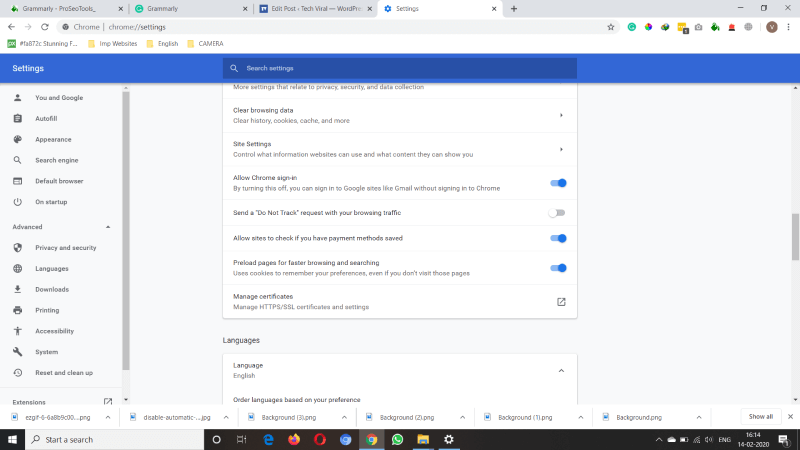
- Go to the Settings and then click on Show advanced settings.
- Here, under the privacy section, you have to uncheck the Use a prediction service to load the page more quickly option.
- We also recommend you to disable flash in Google Chrome.
Mostly the error will solve by those changes. If you also use Skype in your PC, then you have to follow the below steps also.
For Skype
First of all, open the Skype, go to your start menu, sere you will see the Skype icon click on it, or search for Skype.
- Now select the Security Tab and click on the Edit.
- Here you will see a list of all the Groups or Usernames, now click on All Application Packages, check the write option to select Allow which lets Skype write to your disk.
- Then click on, OK.
If, after following all the above steps, you are still facing a problem, then you have to replace your hard drive. It will be better for you if you are a PC or Laptop is in Warranty then you can tell them about your problem and ask for the replacement.
We hope this article on 10 quick ways to solve windows 10 error 100% disk space is used is helpful for you, If the article is useful for you in any manner then do share it on social media. Stay connected with us for the updates related to Technology all across the globe.
The post 10 Quick Ways To Solve Windows 10 Error 100% Disk Space Is Used appeared first on Tech Viral.
from Tech Viral https://ift.tt/38Eem1m

No comments:
Post a Comment